CS-80 V 3.10.1. I was trying to reproduce a GX-1 patch by ear and having a pretty good go at it in the lower register but it wasn’t even close in the upper register. That’s when I realized that the plugin does not seem to include a way to make VCF frequency (high pass or low pass) track the keyboard. I had a go of it using the “Advanced” modulation section (four entries - keyboard to each of HPF and LPF for the two voices) and did the best I could with the ratios. I couldn’t do my usual trick of making the filters self-oscillate and tuning them using intervals on the keyboard because the filters won’t self-oscillate even at 24dB/oct. I couldn’t find tracking mentioned in the manual and couldn’t find anything on the control panel. Did a real CS-80 not have VCF keyboard tracking either?
Hi @NewNumbers ,
Like the original CS-80, then CS-80 V4 have the KEYBOARD CONTROL section. You have parameters to control BRILLIANCE and LEVEL. There is a LOW and HIGH parameter for each. They control a curve like in DX7.
The KEYBOARD CONTROL section is located just above the MASTER VOLUME parameter in CS-80 V4 and left of the volume in the V3 version.
I attach a screenshot from the original CS-80 owner manual here;
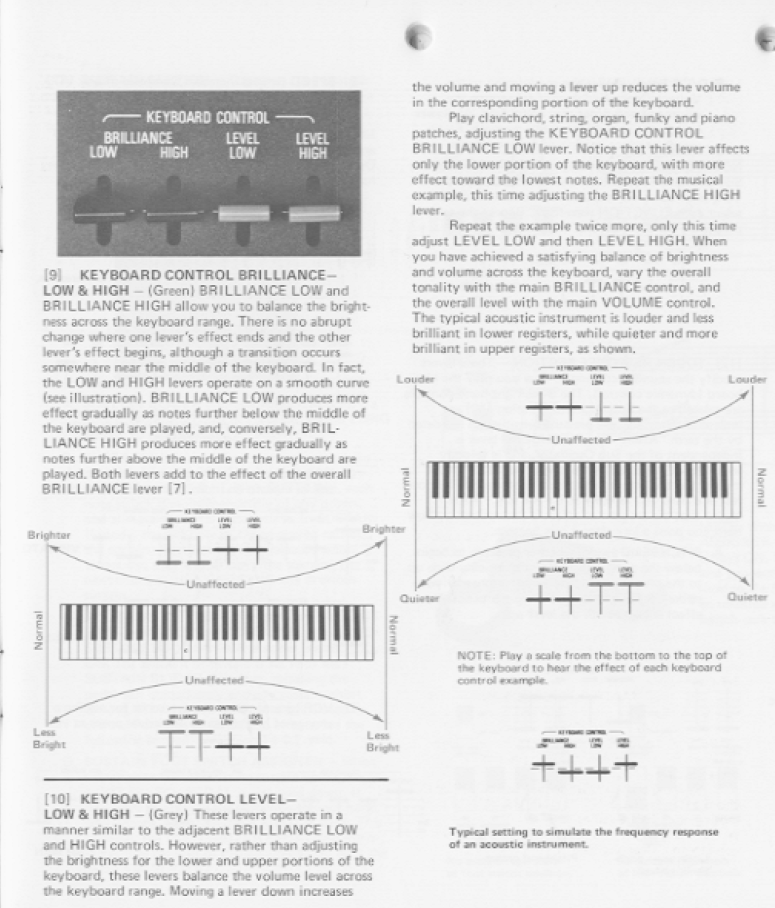
Beside that you have the added the more common KEYBOARD TRACKING modulator in the Advanced sections in both the V3 and V4 section that it look like you have tried. It should work.
CS-80 did afaik not go into self-oscillation. You can read about why here:
https://www.oldcrows.net/~oldcrow/synth/yamaha/cs80/tour.html
3 Likes