Release isn’t working anymore on the Samplers. On the synth parts the release works like it should. This renders the Augmented series unusable for me to be honest…
Anyone else having this issue?
Hi @exm. Welcome back.
Have you updated to the latest versions? Update if not.
Is it about samples where the Release have a Natural/ Synthetic selector? if so have you tried the Synthetic selection?
If this does’nt help, then please add a specific example to test - instead of a generel.
Latest versions (on win11)
It is only about the sample sections. The osc sections work as intended, as stated in my first post.
An example isn’t needed. Just open an Augmented [they all have this bug] a d try to play with the release in the envelope section. The release doesn’t do anything. CC64 is still working, but this is just the midi in for sustain. I am talking about the adsr → release (again, only in the sample sections. The osc envelopes work just fine)
I did try that before i replied. What i tried worked. With sample sections sounds/ OSC’s. So please give a specific example.
1 Like
narrowed it down to the following 2 Augmented instruments;
Voices and Strings.
Just start with an empty patch in Augmented Voices (Default patch). Disable LAYER B. Play something and play with the Release of LAYER A ENVELOPE. The vocal gets cutoff no matter the RELEASE setting
Well, i found the culprit. Such a weird one;
I always save a snapshot for quick loading when starting a new project. Now, with one of the previous updates they added a NATURAL/SYNTHETIC section at the Release of the ADSR’s. My snapshots were from BEFORE that update, so when i opened a snapshot, it didn’t show that NATURAL/SYNTHETIC section. So weird…
But,it is solved!
Well - I can actually confirm. It look like something is wrong. But sometimes it work.
When the ReleaseMode button is there, then it does’nt work like it does in the other instruments. I have no Release time in the Synthetic setting, and only Natural on the Natural setting. Try the Defaukt preset in Augmented Woodwinds for example.
Sometimes the ReleaseMode button kan be there, but sometimes not in the same preset for the same OSC and sample.
Do you have anther behavior?
Yes…just getting back here to report this as an actual bug. Something ís wrong.
To confirm; i have the same behavior you are stating indeed.
Tried a clean install of 4 of the Augmented instruments but without a solutution i am afraid.
It might help you to contact Arturia support. You can it confirmed. Also confirmed it’s being logged. I can suggest you do.
That might not happen here.
I’m a External Moderator, but also a user like you. I’m not an Arturia employee.
i will ofcourse. I would suggest you do the same 
Same behavior here as you describe above - no release
I had this issue also.
I found that by reinstalling Augmented Voices and Strings, this resolved the issue for me.
I think there is an issue with Augmented persia (or maybe an earlier version thereof) ) that causes this issue to manifest in Augmented Voices and Strings.
I believe that if you install Augmented persia, and you get the release issue in Augmented Voices and Strings, then use ASC to reinstall both of these (or whether one you have)
Something to try.
1 Like
Re-installing did fix it (after 3 times…), but that was BEFORE Persia. So this was an issue apart from Persia (in my case at least)
Hi again, so here is the solution, it needs to be implemented in the next release builds for Augmented. Unfortunately it is still not implemented because we have to run some tests on AstroLab, it will happen very soon.
In the meantime, here is the fix:
the default config file needs to be updated for STRINGS and VOICES.
On Mac (PC it’s just in ProgramData not Library)
‘/Library/Arturia/Samples/Augmented STRINGS/Factory/SFZ/default_config_generated.sfzh’
‘/Library/Arturia/Samples/Augmented VOICES/Factory/SFZ/default_config_generated.sfzh’
Now go into that file (open with TextEdit, Sublime Text or some kind of text reader), and replace all its contents with:
// This file was automatically generated, DO NOT MODIFY IT
offset_mode=percent amp_veltrack=0 ampeg_release=9999999999999999999#define $EXT arta
^Copy-paste everything above from // to arta - and then Save the file.
Now re-open your Aug. STRINGS and VOICES, the release should work as expected
2 Likes
No…this did not fix it. It broke it further. There is NO release at all now.
I’m going to attach a screenshot of it instead, because the text is not copying properly, it thinks I’m inputting HTML commands due to the “<” “>”
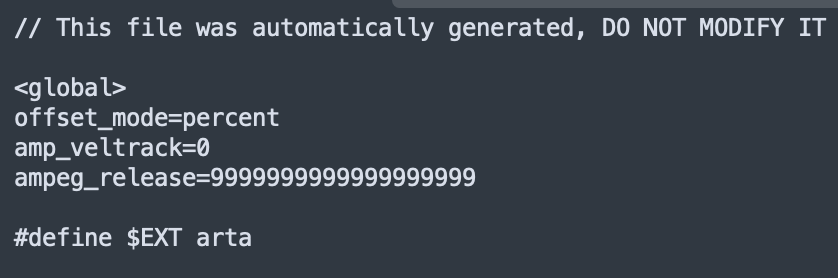
so sorry guys I put the text in bold in the forum so it added " * " around the text, which would obviously break the file.
It isn’t working. Tried the copy-paste without bold text without success.
I will try a re-install again
Yeah, that’s the best solution. sorry it didn’t work for you. I have tested on my end and the releases work well with this configuration
It would help to hear from others on here, whether it worked or not.
1 Like
After a reinstall it should be that text @lily.arturia provide you have in that file. It is here. So i have not changed the file.
So you don’t have to do anything after a reinstall. Correcting the text should be instead of reinstalling, when it does’nt work.
You could make a copy of the file, when it work and use that as a backup, if it at a point does’nt work.
I assume that mean that this file sometimes for some reason are being changed to something else.
Hopefully it’s all fixed after the next update so it does’nt happen again.