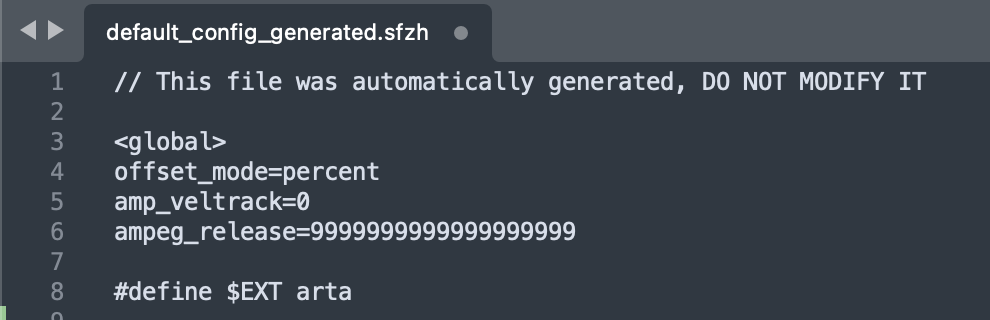
well…the text didn’t fix it here, so that is of no use to me.
Will report back when the installations are done.
Are you sure the file extention for the file have’nt been changed, when you saved it?
yeah. File extensions only change if you re-set the file type, or manually change it (typing by hand). action was: copy → ctrl A → paste → save. That’s how i always change files, unless i want to back up somthing. Then i will change the filename(/type, sometimes)
re-installation fixed it (again)
Good. What’s the text in the file now?
// This file was automatically generated, DO NOT MODIFY IT
offset_mode=percent amp_veltrack=0 ampeg_release=9999999999999999999#define $EXT arta
====================
← is the only change, as far as i can see
I see what is going on. Over here something didn’t come true on the site < global >
Because of the “<…>” signs
1 Like
Thanks for the info @exm .
Look like you’ve got it.
I suggest you copy the files, then you can just replace another i assume, if needed - as long it’s needed.
1 Like
Thanks for that solution, I will give it a go if this happens again.
What I have done is created a backup if those files so I can simply copy the text back into the original file.
Even if it doesn’t work, the reinstall certainly will.
After the reinstall and the releases were working, I considered making these files read only. However, I decided against this as doing this could potentially break future Arturia installation processes. The Arturia installer might need to be able to successfully write to these files to deem the install a success.
Note: I checked those files and they are as above (with the ampeg_release=9999999999999999999 therein)
Does this affect all of the Augmented Series, or just these two??
It’s only Augmented Strings and Choir that have this issue.
1 Like
Right because it got detected as a HTML command
I wanted to attach the file here but we can’t attach most types of files on the forum, for safety reasons.