The title says it all. I’ve noticed there’s no apparent way to use an Expression Pedal to control Augmented Series instrument parameters from Analog Lab.
My Use Case: I’d like to bring in Augmented Brass brightness gradually with my foot, as I play a pad with my 2 hands (multi-part preset in Analog Lab).
It’s true Expression (midi CC#11) unfortunately is’nt a modulator in the modulation sections. I wish it was in all applications.
However - You can assign Expression (midi CC#11) as modulator for a single parameter under the MIDI tab in the Right panel of the application. That should be enough to control a Volume parameter.
If you use the midi LEARN button, then just click the button, click the parameter you wish to control, move your Expression pedal and click the LEARN button again.
While the button is enabled unassigned parameters will show purple - when assigned red.
Thanks for your answer. This helped me clarify my above feature request which I just updated.
My original request’s Use Case mentioned Volume but I really meant Brightness. I had also forgotten to mention that I use Analog Lab. I’ve used Pigments within Analog Lab and controlled it with an Expression Pedal before. But I cannot seem to be able to do it for many other instruments within the V Collection .
So I’m asking about mapping an Expression Pedal to learnable parameters that are within the instrument. In Analog Lab, I think that Assign under Expression Pedal only allows mapping to Analog Lab controls (outside the instruments). And, from what I’ve experienced, clicking Learn in the MIDI tab (in Analog Lab) doesn’t work with an Expression Pedal (on CC#11).
Now you talk about Analog Lab.
In Analog Lab Expression (midi CC#11) is a reserved parameter. You can’t assign that in Analog Lab, as Expression is meant to be assigned in the full individual applications.
If you assign midi CC#11 to a parameter in the full individual instrument, then it should work in Analog Lab too, if that midi config is active in the full application.
Many of Arturias instruments have midi CC#11 as a reserved parameter. Many as a modulator that can control multiple parameters. But unfortunately that’s not the case for all instruments.
I have tried to do the MIDI learn thing, but I was unable to connect the expression pedal to the master volume. In order to be able to program a foot switch to control rotary speaker fast/slow in Analog Lab I had to change the keyboard ID from KeyLab to Generic 9 knobs 9 sliders. The settings in place for B3 V do not transfer to Analog Lab.
I wish Arturia would design all of their V Collection instruments so that it would be easy to map the expression pedal with master volume for every preset. Those of us who gig know that switching from preset to preset, even within the same instrument, can involve a large volume difference from the previous preset. One needs to be able to tame or boost the next preset’s volume quickly, and the best way to do this without having to reach to Knob 9, requiring moving one hand from the keys you may be wanting to play, would be the expression pedal.
As far as i can tell, i can do what i have suggested.
But what exactly is it you can’t do? What exactly have you tried and done where? Which Master volume for example are you talking about?
Perhaps my replies in this topic can help:
It’s possible you have to use Generic midi config. I can’t teat that.
As said then midi CC#11 is a reserved parameter that can’t be assigned to Analog Lab controls, as that’s done in the individual full applications, the way it can be done in those. Just if this is what you mean.
Understood. I have to use the Generic 9 Knobs to be able to affect the rotary speaker speed control in Analog Lab, since it’s more of a stompbox than in B3V. As regards the expression pedal, your assertion that MIDI CC#11 is a reserved parameter is exactly the reason for my unhappiness. I want to be able to use my expression pedal for master volume, and the fact that this is a reserved parameter keeps me from doing that. In the studio, it doesn’t matter, but when you are moving all your fingers during a live performance, if you can change expression with your foot, it doesn’t interrupt your hands. Simple enough. But we all have to deal with the restrictions that are built into whatever programs we work with. It’s a wish of mine that they would change that, but in the end, it’s up to the designers, if I can call them that. It may be that they don’t think this is worth making a change for. It may be that that particular issue cannot be resolved, for reasons beyond my coding knowledge. Thanks again for your input.
It’s the midi CC and not the hardware pedal that’s reserved. You can use another midi CC to control master volume. In generel midi master volume is midi CC#07.
Midi CC#11 is used as modulator in instruments. This would not work, if you could assign it to Analog Lab controls. InB3V2 btw midi CC#11 does control the volume pedal i believe, but not the master volume.
If possible on your keylab, you can simply set a control input on your controller to the same midi CC as Analog Lab Master volume is set to in the midi Config you use, then the controller like a pedal using that input will control it. The same is the case in other instruments.
Thanks for the helpful information. Unfortunately, I do not understand MIDI well enough to know how to set a control input on my controller. But it’s nice to know that, if I ever increase my knowledge to that degree, I can accomplish what I want to in every one of their instruments.
I have understood you have a Keylab controller. But which one?
You can check in your Arturia Midi Control Center (MCC). And/ or in the settings for the input jacks through the controller display. Perhaps have a look in the manual.
If controlling a master volume parameter dynamicly during a performance, then be sure the presets are designed so the possible max output does’nt overdrive.
Thanks again. I have a KeyLab Mk II. I will read the manual and check in my MCC. Perhaps there’s something I missed. And thanks for the tip about the max output. I ran into this when I was doing the same thing in Analog Lab (which involves several steps per preset, but patience is a virtue). I have a Moog expression pedal, which has a max-volume control, which I set so that max output is 127.
Depending on your DAW, you can remap any parameters normally, I use the Modifier in Logic Pro and you can remapp any stuff that you want or even midi learn what you want to control in a plugin also, if I understand well your request that s the faster you can get i think…
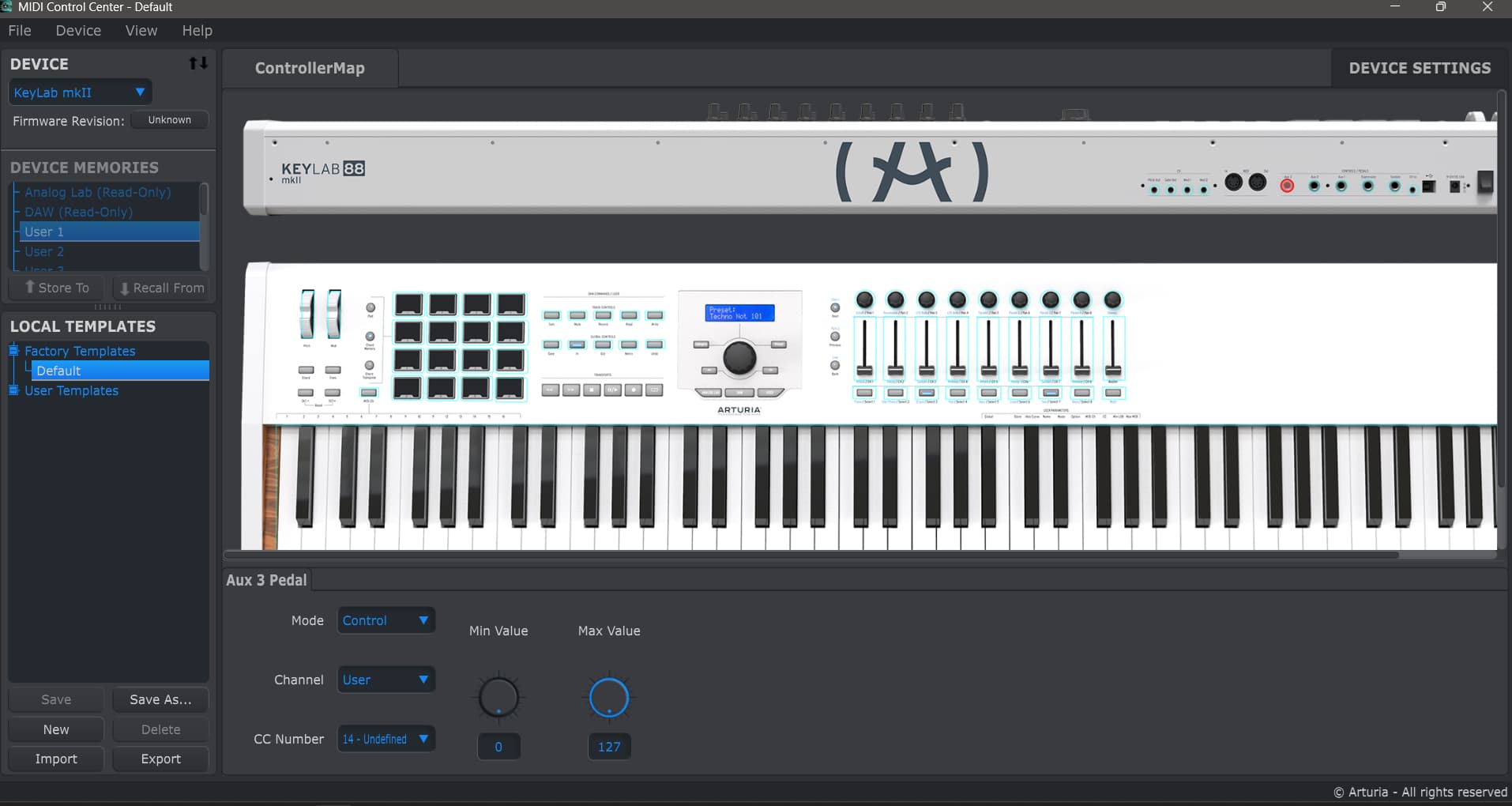
Thanks for your willingness to help. I followed your previous recommendation and re-read the manuals for both the KeyLab and MCC. I recognize that I can map using the User Mode. I am not sure whether I have to use a control input to accomplish this or if I can do so with my “expression” input, but that will become readily apparent if I choose to try this option. My limited understanding of a control input gives me the impression that there has to be a voltage input, so my current expression pedal would either need to be modified (including tip) or substituted. I do wonder if I would have to also re-program the knobs and faders when I try this. Again, this will become obvious when I attempt to set up a user configuration. I do believe you are correct in that this is the only way to address this issue outside of a DAW. Thanks again for your guidance.
Great idea. I hadn’t thought of using the DAW, and I didn’t know that this would be an available option. I use Studio Pro 8, or whatever Fender re-named Studio One. I’m sure it has the capacity to do what you suggest; the next quest will be to find out how to talk to it to make it happen. Thanks for the suggestion.
Studio One/ fender studio have afaik not a midi mapper in the understanding to convert one midi CC to another for your controllers midi output. I use Studio One 6 PRO.
Studio One have Control Link mapping. There are things to understand about this system too.
I suggest you first learn how to use your controller and about midi CC. I suggest you do the below first anyway.
Your controllers midi control inputs can all be set to work in many ways. Just click each of the 5 inputs in MCC, then you can check it yourself.
And you will need Expression midi CC#11 to control parameters already assigned to this control.
There are different ways to do things. It’s very much a personal choice.
I would have two pedals. Keep the one as Expression midi CC#11.
The second i would set a user midi CC. In your and this case i would choose the midi CC Analog Lab’s Master volume is set to respond to.
I don’t have the controllers factory template.
If you only want to use one pedal, then you can create User templates where one set your pedals control input to one midi CC and another template where the pedal is set to another midi CC. Then you can use one or the other midi CC on the same pedal input.
In generel it’s a good idea to learn something about midi CC, when using midi equipment.
You are always welcome to ask questions in the community. There are helpful people around.
EDIT: You can read a midi output from a control in your DAW. For example which midi CC Analog Lab Master volume is set to, if you from your controller turn the control that control this parameter.
Click the midi symbol (DIN socket icon) in Studio Ones lower left corner.
Then set a pedal input to that midi CC.
It should work at once.
EDIT END
_Need help ?
When you can't find the answer online or in the product manual, the Technical Support Team is here!.
_Stay tuned
Follow us for the hottest sounds, fresh content, exclusive offers and Arturia news as it happens.