I was checking the disk usage on my laptop using DaisyDisk and have found the the folder /Library/Application Support/Arturia is quite big.
By inspecting it, it seems like the Arturia Software Center (ASC) installs some redundant files, namely, *.vst and *.vst3 files, and I am struggling to see why.
First, I set in the preferences for ASC to install only NKS and VST3. So, I do not understand why these *.vst files are installed at all.
Second, the *.vst3 are already installed into /Library/Audio/Plug-Ins/VST3. Can you at least make clones. I have checked with the Precize.app by Howard Oakley that the *.vst3 in these two folders are not clones, so the disk space is literally wasted on my computer.
Is it possible that the development team of Arturia improves ASC in these aspects? I am struggling to see why the vst files are installed in different directories, if on macOS, /Library/Audio/Plug-Ins/VST3 is already the standard location. And please, do not install the VST2 files if they are unchecked in the Preferences.
This should not be happening, i’m going to relist this as a bug, so The Arturia Devs will be more likely to pick it up, meanwhile, could you list your system spec, OS etc, a little more explicitly as it could help to track the issue down quicker.
Arturia Support MIGHT contact you about this too, if that’s ok.
I have just installed things in the end of December on a fresh system with Arturia Software Center 2.12.0.3157. I have installed V Collection 9, ACID V, Pigments, plus MIDI Center.
OS is macOS Tahoe 26.2.
Here are several screenshots (3 MB in total) that show that I want only NKS and VST3, that the VST3 has Arturia plugins, while VST does not, and that /Library/Application Support/Arturia has copies of VST3 files and surprisingly also VST files. Also there are two screenshots obtained with Precize.app that two VST3 files are not clones (on APFS), hence use twice more space.
Your completely right.
The ASC sometimes have issues, notably on Mac because following their security rules updates is a bit of a cat and mouse game.
I’m not sure for your specific issue, but please note that the vst and vst3 installation option is quite recent, and some plugins might not have the feature yet even if the ASC have the preference.
From what I remember, I think the FX currently doesn’t support it, this may explain why it installs both. They will of course support this in their next update.
I never heard reports like yours in Application Support folder, I will definitely look into it but I advise your to contact our support. Using dedicated support channel help us better follow and prioritize issues.
Probably a good idea to leave this one open, as there might be others that experience the issue and may be able to contribute, so this can be tracked down fully.
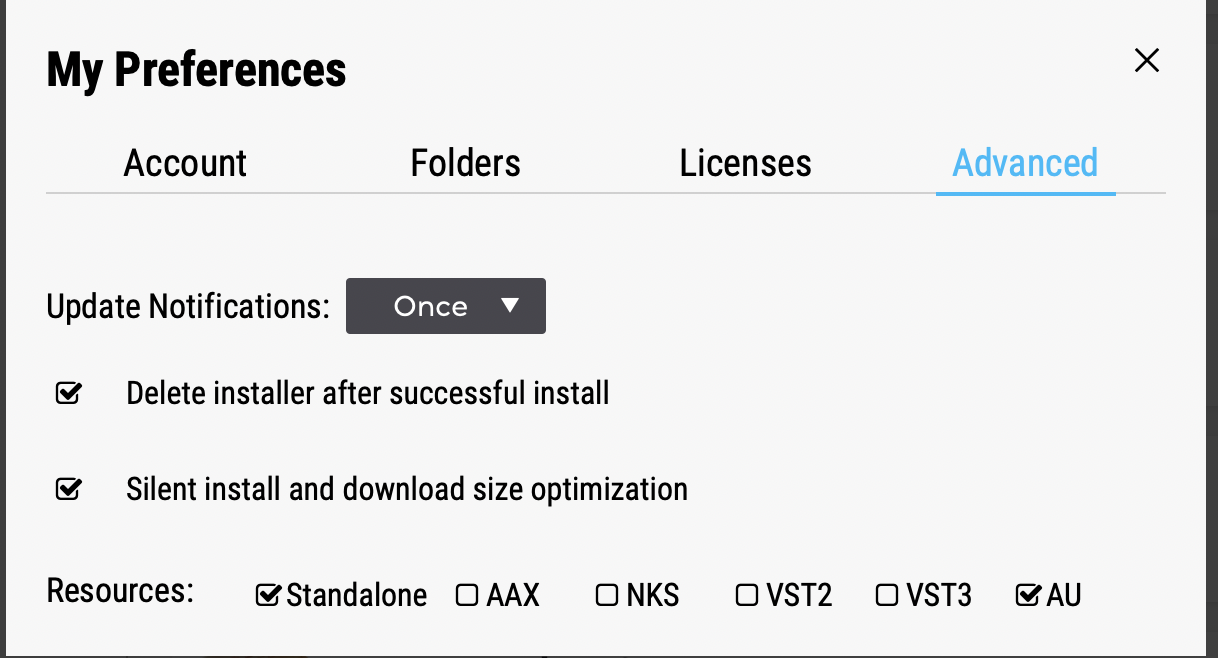
I use a MacBook Air M4 with macOS 27.2.1 and Logic Pro 12. In Arturia Software Center Preferences → Advanced, only Standalone and AU are selected. VST2 and VST3 are unchecked (see attached screenshot).
This issue affects the products across both Arturia V Collection 11 Pro and Arturia FX Collection 6 Pro . I find .vst and .vst3 bundles in the individual product folders under /Library/Arturia , even though those formats are unchecked in ASC.
For example, after uninstalling and reinstalling Mini V4 through ASC, these bundles were still present:
They are about 55 MB each. The corresponding Mini V4 bundles are absent from the standard VST/VST3 plug-in folders, while the AU component is present and works in Logic. Across the product folders for both collections, du reports about 9.5 GiB of VST/VST3 bundles.
Are these bundles inside /Library/Arturia/<product> required by the Standalone or AU versions, or are they redundant copies? Do the ASC format preferences only control installation into the standard plug-in folders? Is there a supported way to prevent or remove these bundles for all products in both collections without breaking AU/Standalone versions or future ASC updates?
If this was your first installation of the products, and you did’nt have the other formats installed already, then i suggest you contact Arturia support through your Arturia account.
Thanks! I had these products installed before formatting my Mac, and VST2 and VST3 were installed then too. This is a fresh reinstall on macOS 27.2.1, with VST2 and VST3 unchecked in ASC, but ASC installed both formats anyway. Would you still recommend contacting Arturia Support in this case?
If the formats was uninstalled so they were not on your computer when you installed again, then yes - contact Arturia support.
I’m not a MAC user. I don’t know if formatting a disk can give results on a MAC where things still is present. But that might be reason. I assume you can see the date and time for the installs. If so you can check it.
Thanks again LBH.
I erased my MacBook’s internal drive before reinstalling macOS 27.2.1, so the previous VST2 and VST3 plug-ins were no longer on the computer. I then installed the Arturia products fresh through ASC, with VST2 and VST3 unchecked. I’ll check the installation dates and contact Arturia Support.
[quote=“wim.van.alem, post:6, topic:8876, full:true”]
Are these bundles inside /Library/Arturia/<product> required by the Standalone or AU versions, or are they redundant copies?[/quote]
I also would like to know the answer to that question.
Because I also have these redundant vst / vst3 files (and I’m on Windows)
Where are the versions you don’t wan’t located? Where are the ones you want located? Do you want the VST versions installed, and have you uncheked the formats in ASC preferences before installing, so they should not be installed?
I don’t have any problem with the ASC installation by itself.
I usually install vst2 and vst3 plugins (and the standalone version), and that’s fine.
Except that both vst2 and vst3 are also in the “x64” folder for each plugins
(ex : C:\ProgramData\Arturia\Acid V\x64).
It’s 50 Mo for each plugin. I have nearly 100 subfolders in the “Arturia” folder.
So 100 x 50 Mo = 5 Go
If these redundant files are not mandatory, I would rather save these 5 Go for something else.
Ok. Yes you are right @OliArt . I have them too. I also don’t see any reason to have them there too.
I suggest you report this directly to Arturia support.
_Need help ?
When you can't find the answer online or in the product manual, the Technical Support Team is here!.
_Stay tuned
Follow us for the hottest sounds, fresh content, exclusive offers and Arturia news as it happens.