“Arturia promised a future update “soon””
There’s your answer Rich.
Have a good day.
“Arturia promised a future update “soon””
There’s your answer Rich.
Have a good day.
People, be careful what you wish for…
In Arturia time is that another 6 months?
For my part I want to say, that I like the MiniFreak and how Arturia is adding features to it, even if it takes some time. I bought the MiniFreak for the features it already had - not what I hoped it could get sometime. If one bought it for future features hoped for - one should be patient or change their buying-attitude I think.
Thank you Arturia for what you deliver to us even after the devices are a while on the market.
My “buying attitude” toward Arturia is already set toward never buying again from them. You sound like a paid shill.
Rich just calm down. You even liked my post on the 25th december 2024 [Changing OSC type doesn't show up on screen? - #3 by marturi.9]. You really think I am being paid by Arturia, just because I do not support your attitude in this case here? Come on…
My thoughts are you buy a product for what it can do at that time - perhaps with a hope and desire that the feature set will expand over time. The Minifreak has been pretty well served in terms of new features since its launch and they were free updates. Pigments is another example of fantastic free updates. We are on version 6. I bought version 1 and have not paid a penny for upgrades since.
It’s not unreasonable to want certain features, so request them. It seems a little unreasonable to demand them. Arturia has a roadmap. We may influence it somewhat and they would be remiss in not listening to us (I believe they do) but ultimately, its their product and their decision
I too would love to be able to add user samples. Now that V Collection 11 is out the door, as is the Astrolab 88, maybe Arturia can dedicate some time to this update.
https://www.reddit.com/r/MiniFreak/s/x5IVS21t1E
There is now an (unauthorized) way to craft your own samples for the Minifreak Sampler engine. It should be understood that Arturia has not vetted or created this method, so you should conduct your own due diligence when experimenting with this.
Github link: GitHub - mtizim/minifreak_sample_conv: A minifreak sample converter to enable user samples
Have fun, be safe.
Nice one.
Seeing the code, this should work as expected but:
I don’t see any other points, that’s clever and I don’t think (personal opinion here) there is any risk to use it.
Have fun !
Cheers !
In my review of the code, it defaults to 3 seconds for the sample unless you provide a different/bigger number. Longer samples appear to be possible.
I have not tested this, though I will sometime in the coming days.
The real question is: how much memory/storage space is allocated to sample storage and use in the engine, and how long can a sample actually be? I’m sure a perusal of the factory samples would provide some answers.
I would guess that someone looking to experiment here would be smart to back up the factory samples to a different folder before playing around.
Still waiting…
Hey hey,
here is the OP from the importer Sample tool published on reddit a few months ago
As I am still blocked and banned by reddit i´m sharing this here.
You can actually import custom user samples, but it’s not officially supported yet.
I figured out the expected file format and (re)built a tiny tool that converts your sample to the expected file format. You are then able to transfer the samples via MinifreakV on your hardware.
There are a few limitations (< 3 seconds, 8bit quality, etc.) but it has worked very well for me for 6 month now. You can get it on Gumroad for 1 beer if you’d like to support the project.
App Description:
### ✨ Key Features:
* **Zero Installation (Mac & Windows):** The app is a single, self-contained HTML file. Just open it in any modern web browser. It runs 100% locally on your machine—no internet connection or cloud uploads required.
* **Precision Waveform Editor:** Drag and drop your audio (`.wav`, `.mp3`, etc.). Trim your selection with sub-sample accuracy. Use the new toolbar to smoothly zoom in and drag/pan across the waveform.
* **Smart Loop Engine (Experimental):** Creating seamless loops is hard—CSI makes it easy. Click **AUTO-FIND** and let the algorithm scan for the perfect, phase-aligned zero-crossing to prevent pops and clicks.
* **Hardware Visualizer:** The app generates a virtual representation of your MiniFreak's interface. It tells you the exact value you need to dial into the orange **"Shape"** knob on your hardware to recreate the perfect loop.
* **Synth Mode (Flatten Sustain):** Want to turn a decaying piano or guitar pluck into an infinite ambient pad? This mode automatically levels out the volume decay before looping, ensuring a steady, continuous tone.
* **Hardware-Safe Export:** One click exports your sound to the required `.raw12b` format. CSI also automatically applies hardware-safe naming limits (max 16 characters) and tags your files with the loop point (e.g., `LP45_MySample`) so you never forget your settings.
* **Studio DSP:** Built-in automatic normalization and anti-click fades ensure your samples always sound pristine.


**⚠️ Important Note:**
*Transferring custom samples is an unofficial feature. Always back up your patches and presets via the MiniFreak V software before modifying your synth's sample banks!*

Any questions? Just ask!

Have fun and read instructions carefully!Hi Ullah! I’m the OP on this thread, and I just bought your CSI. Question: someone earlier in this thread said that they had perused your code and they thought that any usage of custom samples through your tool would “break” any presets that use factory samples?
Can you elaborate on that-is that what I can expect? It’s not necessarily a disqualifier to me using your tool; I’d just actually like to know what to expect by using it.
Hey Deepmojoman,
Thanks for trying! Just finished work and enjoying the beer you bought! Cheers!
Has everything worked out for you?
I’ve never encountered problems with factory presets that use sample engines (or grain, frozen, etc.).
But of course, when manipulating, deleting, or renaming those factory samples in the Minifreak V directory, you could break a preset if you’re not careful.
That is why I recommend pulling a fresh backup before you start exploring.
Btw, duplicate your Minifreak V file directory and save your Minifreak backups in an external folder. Just in case.
My guess regarding the comment is that the person you mentioned was confused by the Freak’s synchronization method. When you connect your Freak to the software, you are able to access all presets in the software; it will play and show them on the device, BUT it does not sync all played presets automatically. You have to move them manually to the Freak or into a backup.
I just rechecked to see if there are any problems with factory sample presets, only to realize that most of the current presets in MfV are not loaded onto my hardware.
Greetings from Berlin !
Hi
I put back my comment here:
I’m not a MiniFreak expert you’re quite right.
But if I understand it well, the tool overrides the factory samples that are used in factory patches, it will completely “break” them (breaking as changing drastically their sound).
Is it a problem ? It’s not if you don’t use factory patches or if you don’t care about changing their sound.
Honestly, kudos to you for making such a tool. I personally love seing our community making great stuff like this.
Cheers !
Haha,
sry, was not aware that this was related to your post 
To clarify, the tool just creates samples in this strange (you know better) “.raw12b” format. Nothing is being overwritten automatically.
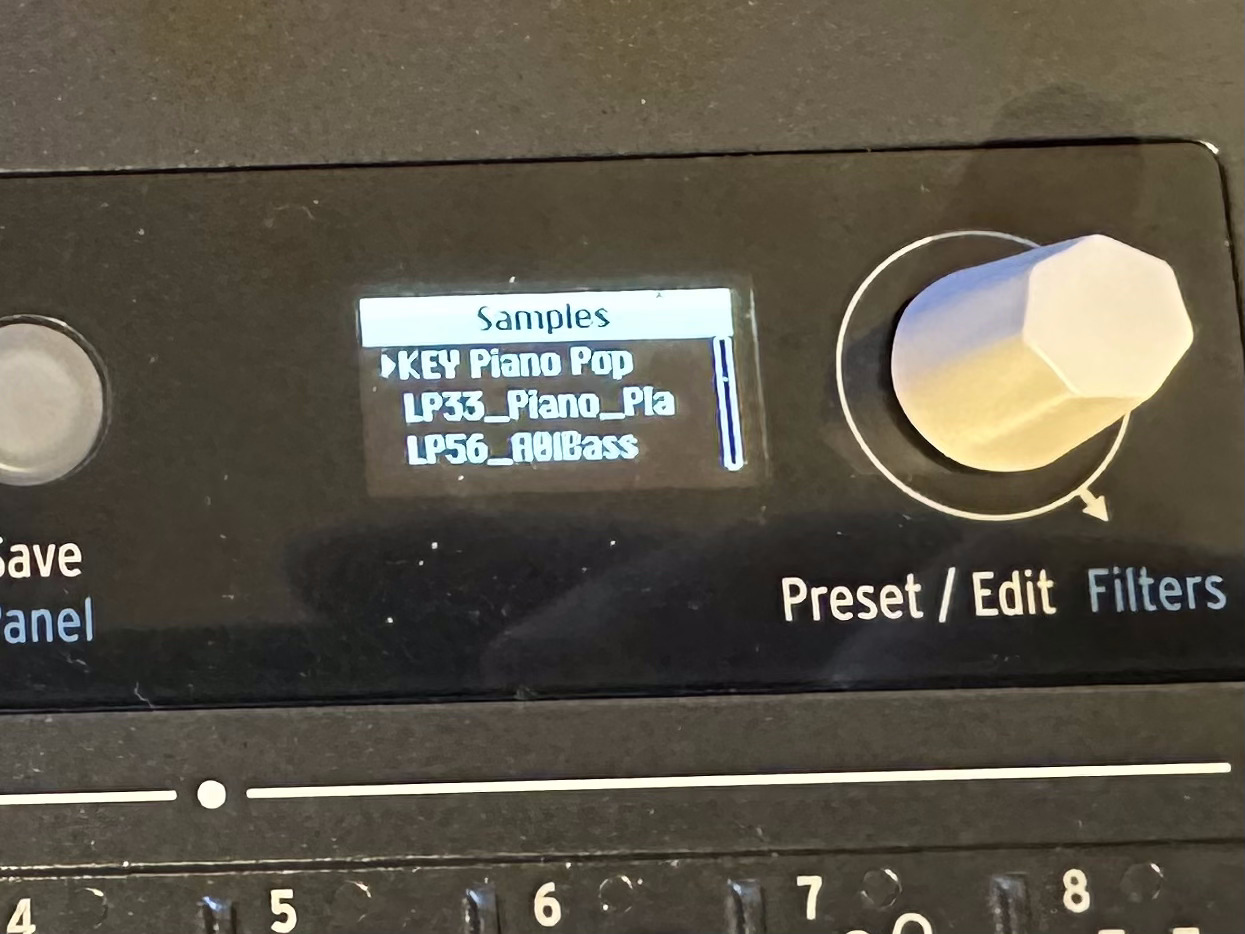
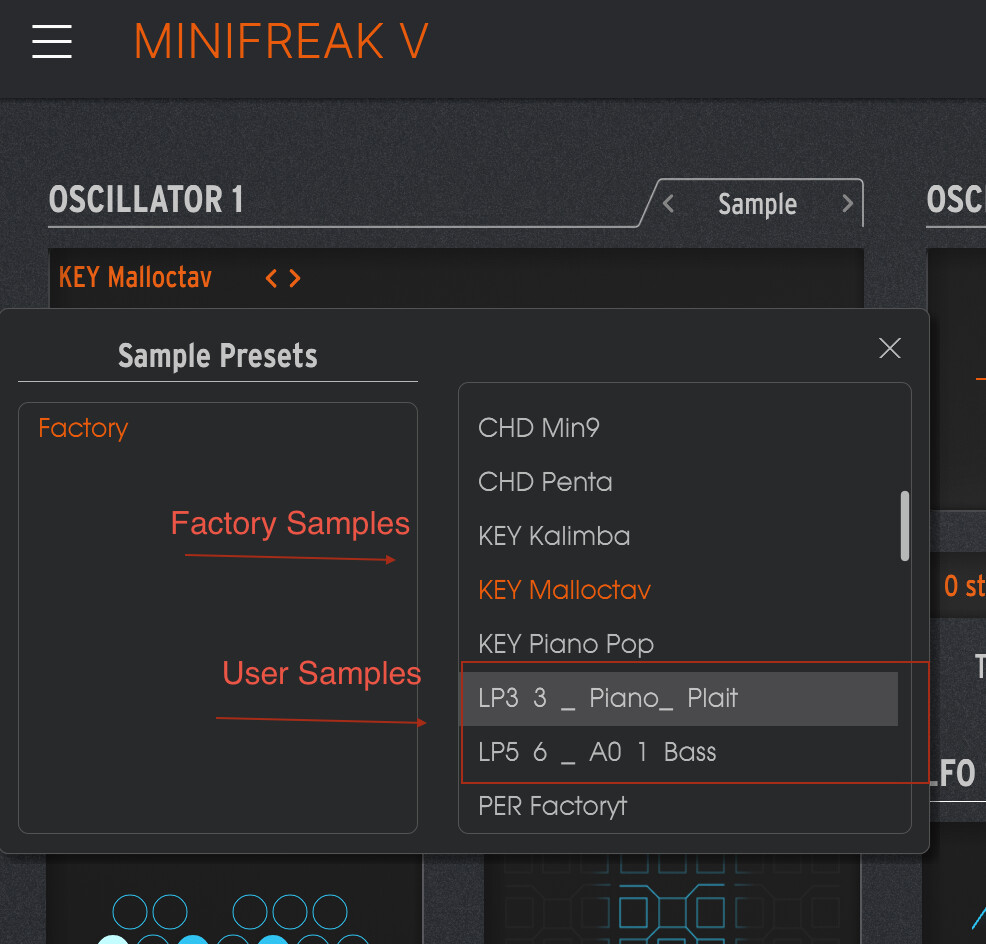
Users just have to place this created files manually in the Minifreak V sample folder. There they are coexistant with the factory samples nothing has to be overwritten. On hardware, after synced the device, you can just select it from the list with Shift+ Type combo as usual. In Software it is shown in the List.
Ok ! Very nice.
I may have misunderstood something then.
I’ll try to take some time to dig a bit more and understand better what you did here
In any case, respect !
And thanks for taking some of your time to do such tool.
Quick question: in your app, there is a blurb which instructs the user to place their converted sample files into this hidden directory: Library/Arturia/Samples/MiniFreak V/Samples.
But my directory is organized a bit differently: firstly, I have all my Arturia samples on a disk other than the startup disk-although I have placed an alias for that folder into the first level of Library (it is entitled “Arturia Samples”, not “Arturia”). Then it goes as follows: Arturia/Samples/MiniFreak V, and then inside MiniFreak V is: Factory, and inside Factory is two folders named “Samples” (where all the factory samples reside), and WT (the wavetables).
So the question is: should I create another folder on the same level as the “Factory” folder entitled “User”, and put my samples in there? Or what? How should I treat this situation?
Ok , an update: I went ahead and just tried putting my converted sample into the Factory sample folder (in reading your instructions more closely, I gathered that this is what is supposed to happen). And it actually worked-sort of.
When playing a patch I had created with the new sample, it worked perfectly-in MiniFreak V. But when I tried playing it on my actual hardware Minifreak, I noticed that both the new converted sample played, ALONG with whatever sample the hardware synth decided it had displaced, in the order it was expecting to encounter the samples. So, I’d always hear a double sample: my new sample, as well as a factory sample.
So, how would I remedy this?
I’ve perused your last comment on this thread a bit more carefully, and I’ve noticed that you’ve said that after placing your custom sample into the correct folder, you have to re-sync your hardware unit to MiniFreak V. That could mean a few things in minds eye: un/relink the hardware? Do a new backup? At any rate, when I sit down again, I’ll sift through the possibilities and see what happens.
I’ll keep everyone posted. Thanks again.
Follow us for the hottest sounds, fresh content, exclusive offers and Arturia news as it happens.