Now you should record and playback via midi every movement on the hardware panel, including morphée and ribbon.
Andrès recommanded to write enable the automation when recording, I did’nt, it seems to work fine like this.
Some issues remains :
if you record very quick Morphée movements , a delay and errors occurs when midi playback : I guess it’s too much midi information to transfer at the same time, as Morphée sends A LOT of CCs if I’m not mistaken.
I didnt figured out how to reset the patch to his initial state after a play/stop in Logic. So for now I reload manually the patch before printing the track.
you noticed Polybrute is a living soul machine , sometimes she (she ? he ? it ?) have some weird reactions. She will not play the exact same thing at playback, so think about audio printing your performance !
Still investigating after I discovered some another strange behaviour : if the Polybrute Connect track is not set with “Monitoring On”, when I select another track Polybrute plays in advance : something like 1/16. Weird !
Another weird behaviour : I just realized that a muted Polybrute Connect track, or any muted midi region on it, still transmits midi to the Polybrute ! The only way to mute it is to power off the track.
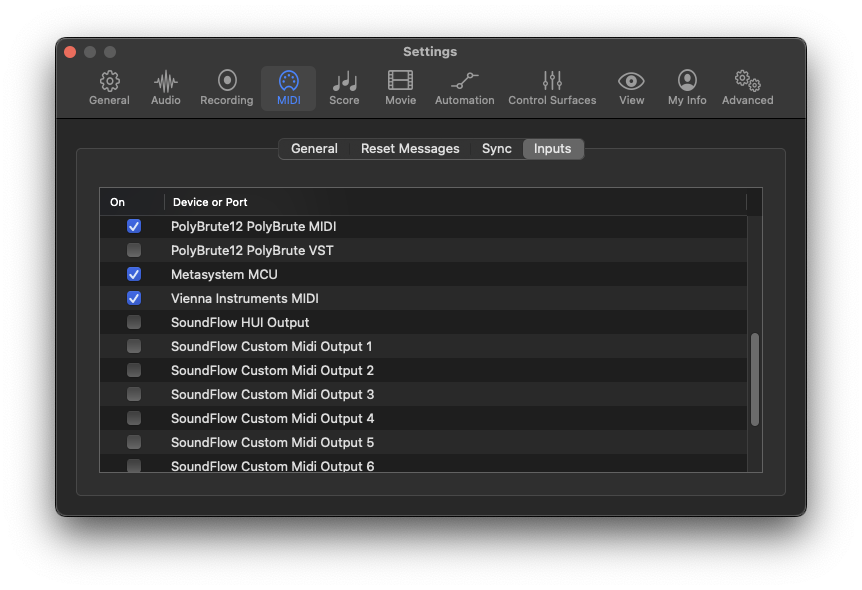
Using the MIDI Monitor in Logic Pro X Environment, I was getting spurious MIDI output which was causing issues with other parts of my MIDI studio. Turned out that I still had “PolyBrute12 PolyBrute VST” as an active Input. Léo from Arturia tech support helped me find it and disable it. It is pretty amazing all the complicated steps involved (many of which I was completely unaware) to get things to work together in Logic; don’t get me started on the Yamaha Montage M8X! Anyway, it is great to be able to access all of the MIDI controllers on the hardware panel- Spectrasonics has promised Hardware Integration support for the PolyBrutes in their Omnisphere 3.0 VST. It should be a lot of fun using the PolyBrute Ribbon, etc.
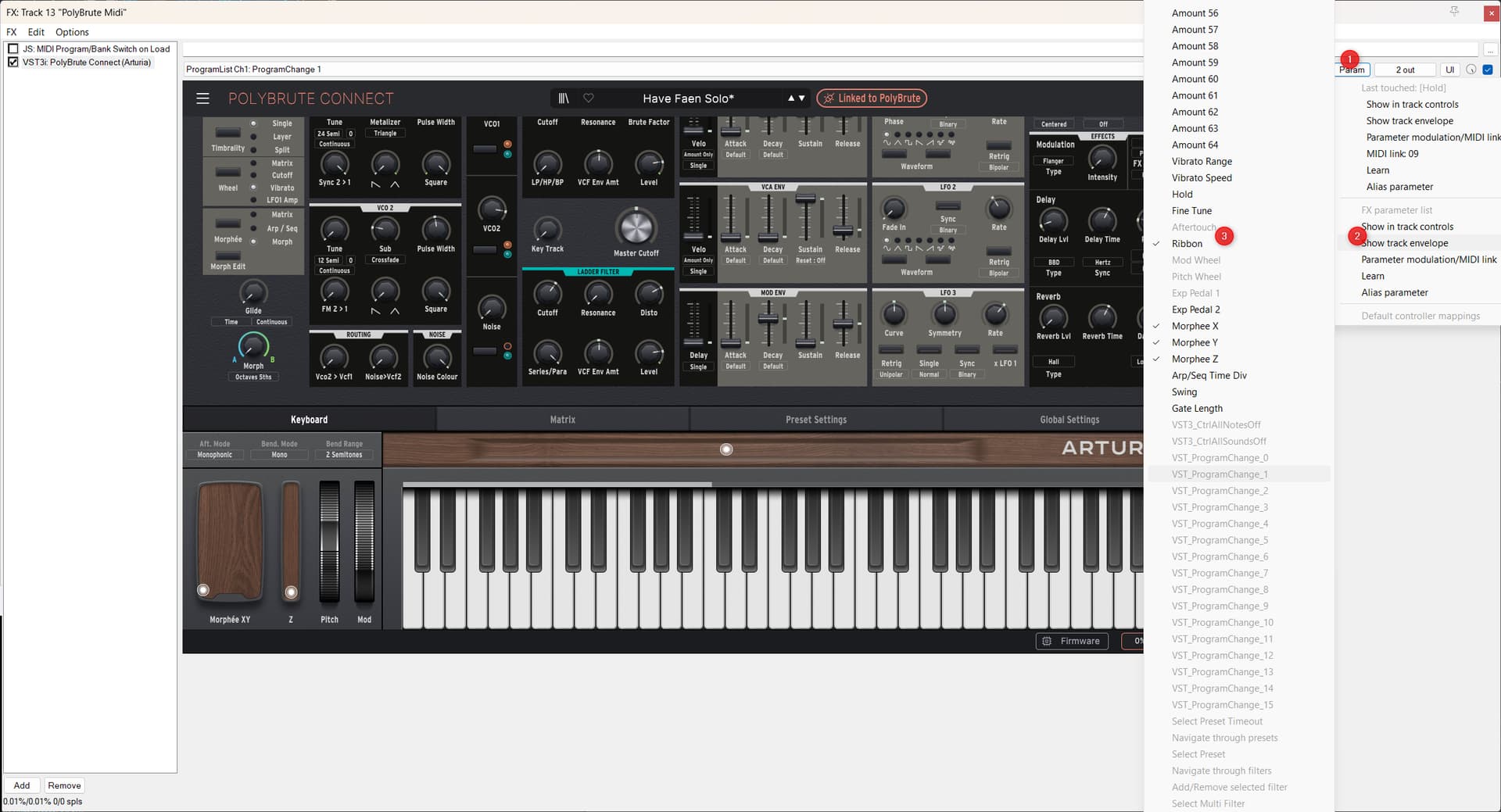
The way it works in Reaper:
Since the VST does take all the Morphee and Ribbon CCs, but disregards all those CCs send to it, only latch recording of the VST will work. There is no way to use external controllers for these, as far as I can see, since the M and R only send CC, but will only receive NRPM from the PolyBrute Connect VST.
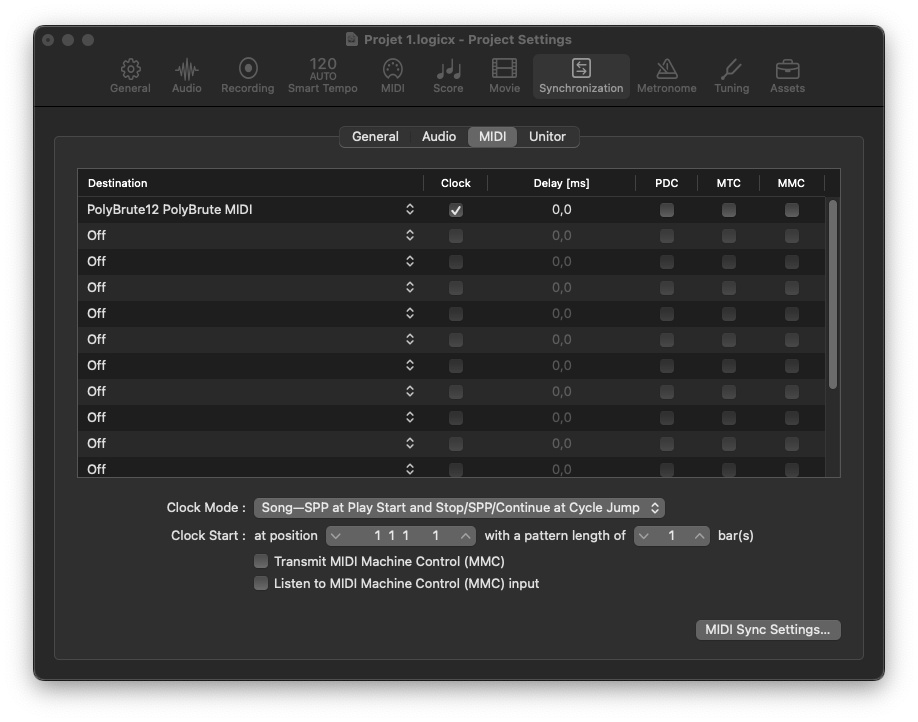
Have the MIDI settings as above: PolyBrute MIDI as Input including Control, and as output, sending clock as well
Have one track that has the PB Midi In Device and the PolyBruteConnect VST.
Have that track send Midi to the PolyBrute Midi Device
In The FX Window enable all relevant Ribbon / Morphee track envelopes to be shown (see screenshot for the Ribbon)
The envelopes will be shown in seperate lanes, you may want to push them to the main track by de-selecting “show envelope in lane” when right clicking the lane(s)
Important: set envelope automation to “Latch” mode!!! If not, nothing will be recorded, since latch records the movements in VST. (do so by right clicking the track name, that’s easiest…). Don’t use Touch, that might cause issues when also using the Morph button.
Have one audio track that will take the audio output of the PB. You may also use this track for recording the actual audio once you’re happy and disable the Instrument track
Hint: should automatically start displaying all envelopes of all touched / moved elements in the VST…
In Bitwig, things are really straightforward:
Enable the PolyBrute Midi Input as Controller, under Sync (Settings) enable clock to the VST, have one track that has the PB as Midi In, and the VST somewhere in the chain (I have it first always). Have another track for the audio - and voila. Automation of the VST will be automatically recorded.
Theoretically, but PB’s Morphée (3 dimensional controller) sends three Midi CCs, but does not respond to them. So simply catching the performance Midi with Morphée (or the Ribbon for that) would not replay. The Morphée and Ribbon expect NRPN data. The PolyBrute Connect VST catches ALL Midi going into the track and converts them to VST automation. The VST automation from the track in turn will be used to control the VST, which takes the duty of translation to the PB. It works like charm once you have it running, and I cannot see any significant lag.
The HW device would work if you never used the Morphée or Ribbon. X/Y axis of the Morphee used diagonally would emulate the Morph knob, which in turn is a Controller that accepts CC data.
The concept of using the VST with automations to control the PB is actually quite cool, since it allows for easy control of the PB with either external devices or Bitwig modulators without the pain of learning CCs…
A little bit overblown for the VST fraction, but since I love HW Synths and their workflow for sound design, for me this is the best of both worlds.
1 Like
_Need help ?
When you can't find the answer online or in the product manual, the Technical Support Team is here!.
_Stay tuned
Follow us for the hottest sounds, fresh content, exclusive offers and Arturia news as it happens.

 , sometimes she (she ? he ? it ?) have some weird reactions. She will not play the exact same thing at playback, so think about audio printing your performance !