Would it be possible in any way to make the pads on KL mk3 usable in any way ?
When triggering something the pads will doubletriger without leaving the finger. It’s nearly impossible to use them in a live situation or play a straight beat without double triggering.
I played a lot of pads in the last years. Cheaper ones and more expensive ones but this are by far the worst pads i ever played. And the Keylab Mk3 is not a cheap product. Why are they there when they are not usable ?
Hi Florian
They should not be double triggering when pressed.
I have not used one myself, but someone here might have some insights.
Alternatively you could raise it with our technical team to make sure there isn’t a issue with the hardware:
1 Like
Using a KeyLab49mk3 here, and I’m not getting any retrigger from the pads.
I can hit pads from very soft to very hard and never get any double trig.
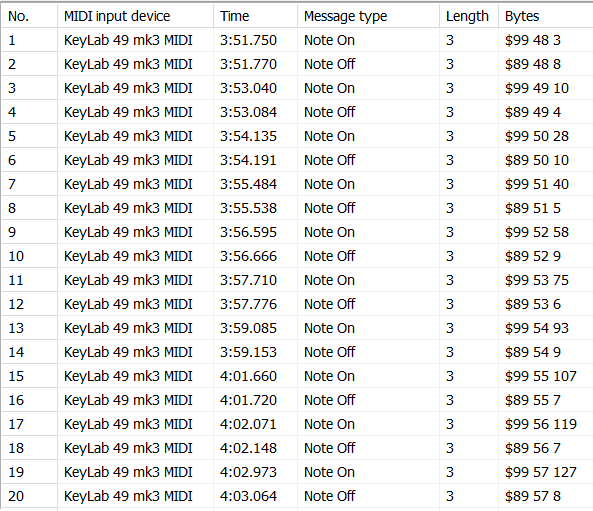
Is your KeyLab placed on a stable surface/support?
Can you record the MIDI output of your KeyLab when you hit the pads (like I did above with MIDI Tools)?
Yes it is.
Its only with the softer hits.
When i play hard and concentrate on hitting the middle of the pad, it will work more or less. But when playing soft, it’s sending out note on and offs without really leaving the pad. The midi snapshot will not help. I made a little video.
You can watch it here https://www.dropbox.com/scl/fo/w73g5rbz4f6c9pn570u78/AK-GXw16-3nkJi8U0pgPu74?rlkey=8chsspikqy31zbs3ufzjq7v8n&st=k2h46231&dl=0
HI @Florian and thanks for the video.
Is there any chance you could re-shoot it in landscape, please, as we’ll be able to see MUCH more clearly.
Also, could you record some midi at the same time, take a screen shot of the midi event list, as @Sean_W above has done, again it will help us to home in on the issue for you.
Uploaded a new video
https://www.dropbox.com/scl/fo/1t8g416fbgfahqiq03m14/AE8XrnvU2Q4WH1J_1or8ZVU?rlkey=odjf0luboc3j52j0qucv300vs&st=uxkgmf5n&dl=0
and the picture
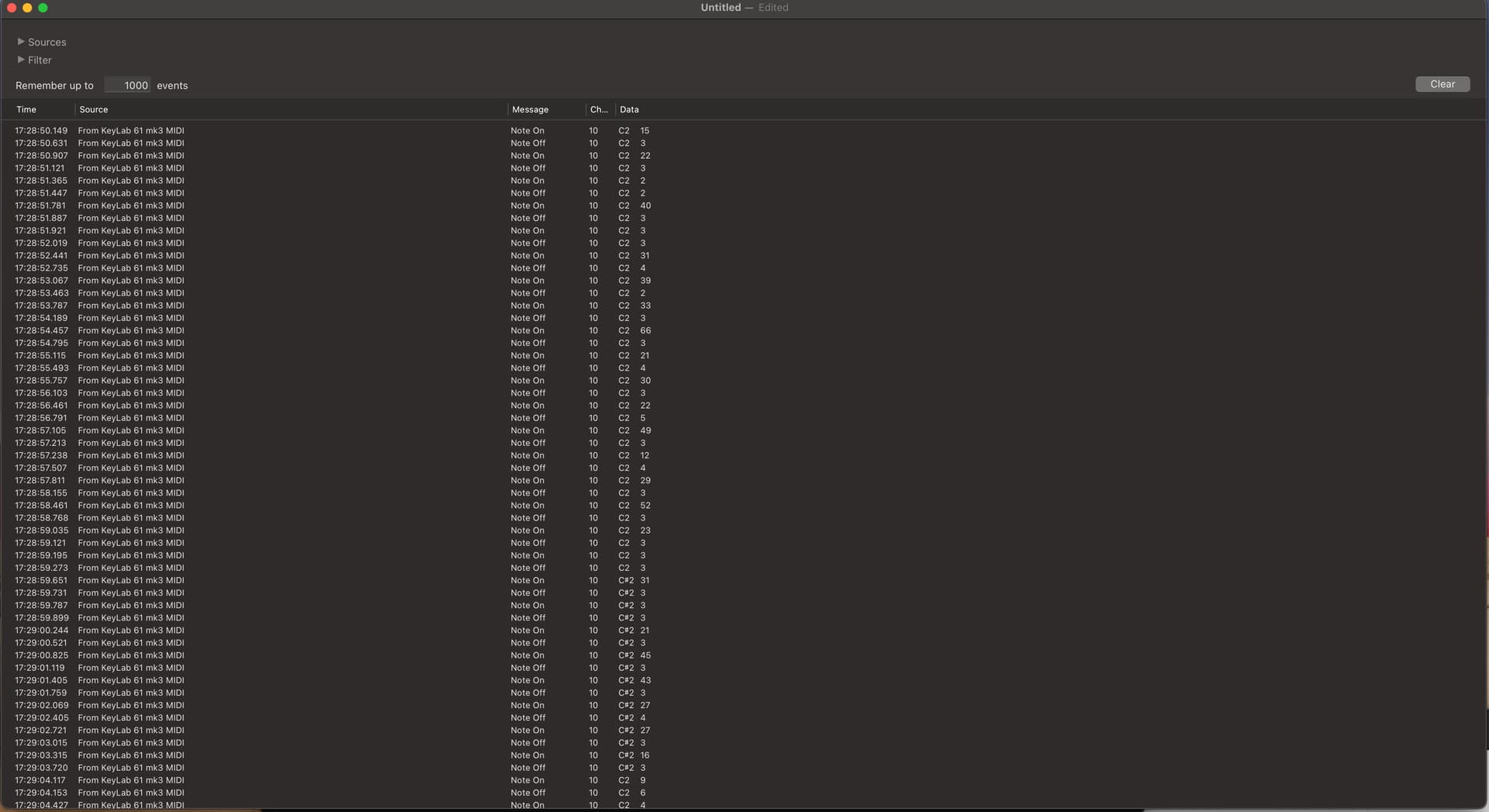
Ok thanks,
Can you try hitting your pads differently, currently you’re keeping your finger ON the pad after hitting, a better way of doing it is to remove your finger immediately after hitting the pad.
I don’t have pads here, but the technique is the same… Hit the pad and ‘release’ immediately, it removes any chance of even a subtle double trigger by accident.
Hit and remove your finger MUCH quicker, drummers don’t keep their sticks on the head of the drum after hitting them, they bring the stick back up so it doesn’t interfere with the drum head, unless they’re doing something like a ‘press roll’. (think military drum roll).
To me, it looks like there could be a bit of a technique issue, have a look at the video below, i’ve programmed A LOT of midi drums over the years and have found this method to work really well.
Remember you’re playing a drum and not a keyboard, the techniques are quite different.
Try that and let us know how you get on.
I specifically tried to provoke the problem for the video. Of course, I don’t play drums like that. But if you play with a little feeling and velocity, it doesn’t happen very often, but it does happen regularly that you double-trigger the pads if you don’t always hit the center of the pad with 100% velocity.
I think i did enough videos. Like i said, i hadnt the problem with other pads.
Thank you
Hi again @Florian
Thanks for trying that out, we need to try and eliminate all possible causes of course.
After some food etc… it COULD be something physical, such as if there has been some kind of ‘incident’ in manufacture or transport, as this isn’t a common observation.
Can i ask how long you’ve had the unit? If it’s still under warranty, you should be able to ask for a replacement or repair.
HTH!
It’s 8 weeks old. So it’s under warranty. But it has to be save that its not a normal behavior, otherwise it would be a lot of trouble only to recognize that the other models have the same problem.
@Florian I looked at your video.
I checked on my unit and it doesn’t matter if I hit the pads in the center or not (even in the corners), whether at low, medium or high velocity. No retrigger ever.
The only way I can reproduce the multiple triggering is by leaving my finger on the pad and moving my finger around the pad with just a little pressure, like you do on pad 9 in the 2nd video, between 0:15 and 0:17.
This is normal: by moving your finger on the pad, depending on how much you press and release the pressure, you switch between triggering the pad, un-triggering then re-triggering.
I also have an AKAI MPC4000 and it does the same thing if I keep my finger on a pad and vary very soft pressure around the pad.
Except that on the MPC, if you hit a pad hard “sideways” in a corner, you do get double-triggering, like a “flam” effect. I used to have an original MPC60 and it did the same.
What is not normal is when you get double-triggers just by hitting the pad softly (whether in the center or a corner) and releasing your finger (and not moving it around the pad).
Out of curiosity, in the Settings / Pads menu, what did you set the global Pad Sensitivity to? (even on High, I still don’t get retriggers other than with the finger continuous soft pressure on the pad, but you might want to try different settings)
And in the Pad General Settings, which Velocity Curve are you using?
It’s probably what you’re describing. Unfortunately, when you play a soft groove with several fingers, your fingers often wobble a little, which triggers the pad twice. The pads just seem to be bad. I didn’t have these problems with a Push 1 and 2, an old Akai controller, or the Launchkey.
The funny thing is that every time you try out a new feature on the Keylab, you find a new bug. I just noticed that the pads don’t send any aftertouch in Ableton DAW mode. Only in Arturia and user mode.
Add to that the bug where fader 5 in Ableton has no info text, the touch sensitivity of the encoders doesn’t work properly, and the scale mode is also more than poor, and I’m just disappointed with the keyboard. I found the keybed the best ifor non hammer action keyboards. very comfortable to use, which is why I kept it. But it doesn’t exactly contribute to the creative process when you get the feeling that no one really bothered to test the device before it was sold.
Oh, and there’s also a bug with the screensaver. When it’s set to the shortest time, the keyboard doesn’t wake up properly. The screen then remains dark. But that’s the least of the problems. Just set it to a longer time and it works. But then the screen wears out faster.
Oh, and by the way, is it normal that you can move all the pads (i.e., with the circuit board) about 2 to 3 mm back and forth when you press them, and that they crack loudly when you move your fingers to the corners on the pad, e.g., during aftertouch?
As i think i’ve said before, i do not own a KL, so can’t speak from personal experience, but it sounds like you might have a defective unit there.
I’d be inclined to ask for a replacement unit from whoever you purchased it from.
HTH!
from my perspective they are not designed for fingers drumming, or they are the worst so far on the market…
as you noticed half of the surface of the pad is not responding, a shame in this price range…
I just use them for poly aftertouch, and its not working in daw mode unfortunately, I would appreciate that we can delete the daw mode and arturia mode because they are stupidly made, like arturia mode faders and encoders are not set on global mode so you can change the midi channel of the keyboard but not the controls channel… daw mode is just useless for logic just taking space on the 8 modes…
I got a 61 that I will return because encoders 3 and 5 are not working properly since some days, I kept it for the keybed like you, before it have issue, but on every other aspect this keyboard is a joke, and really expensive joke… welcome in MK3
I thought the your unit was brake but my pads are moving the same, as you say more we go deep in this keyboard more we are disappointed…
Arturia will lost a lot with those new usb toys, do you see any of these on live scene? no and you wont… or just for the keybed, this is a commercial trap like a cute girl attractive so confident but finaly so stupid that you want to run ahaha
i dont know if I should change mine or just run… no midi improvement for now and I need a MIDI master keyboard, it need a serious firmware update for now its still a very beautiful toy…