So, for the past week or so, none of my Arturia products run in standalone mode. I open say V-Collection 11-Pro, Tsk Manager shows that it’s running, however, it’s not. I’ve even tried opening the various products as an administrator and no luck at all.
I’m running Windows 11 on a pretty powerful i9 based desktop.
Is / has anyone else experienced the same issue and if so, how did you resolve it?
The first thing i’d try would be to reinstall all Arturia products from The ASC app.
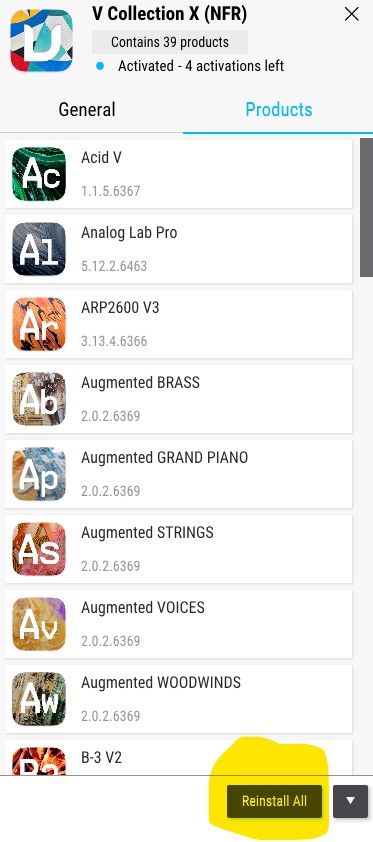
If you run it, click on the ‘V Collection XI’ row in ASC, and you’ll see something like this…
Click on the ‘Reinstall All’ button, highlighted in yellow, let it run, restart your machine and then see what happens.
This can often fix this kind of issue.
Hi again Pat, so this is a recurring issue for you.
I do not work for Arturia, @LBH and I are both ‘external mods’ and so have limited resources.
Let’s see if there is a pattern leading up to this to see if it can be avoided in future.
Have you had any windows updates recently and was this the case on the other occasions?
I do know that the recent Win update to Midi stack 2.0 has, and is causing various issues for quite a few people currently, some of them seemingly unrelated, i’ve had win updates cause the occasional bout of havoc on my own system too.
Are you backing your system up regularly too, in case of situations such as this so you can just roll back if needed?
Are you saying the instruments worked one day, but the other they did’nt?
The task manager say the application run. (I assume you mean a individual instruments). So what do you mean by it’s not running? Can’t you see it at all, or do you mean something else?
You mention Standalone mode. Are you saying you have no issues, when you use the instruments as plugins? If you do, then have you tried to update your graphics?
Have you updated or installed anything before it stopped working?
Do you have a security system that can block the applications?
Thanks so much for your response and concern. This is a new issue, but I’ve had other issues n the past and the response from Arturia is always the same…sorry, just uninstall and reinstall.
I have had Windows updates and will check or maybe roll back some f the updates.
Yes, one day everything as fine and the next day it wasn’t.
If I run any of the Arturia synths or Analog Lab, it does not open. When I open Task Manager, it shows that it’s running, however, it does not open on my monitor and my controller does not activate the way it normally does. Not too sure how else to explain it.
I’ll roll back some of the MS updates and see if that works.
I am not a Windows guy (not for many years), but as @LBH asked: are they running ok in a DAW?
Also, and it may seem an odd question, but do you use multiple monitors? Could the instance be on a secondary monitor?
Also, I remember from my Windows days how much it relies on graphic drivers. You could try a standard 1024x768 resolution and see if the plugin is visible.
I have not heard of any software issues like this with the new Windows MIDI update.
I run Windows 11 version 25H2 on my second computer, and i don’t have this issue.
But there are known issues afaik.
And yes like @Funtmaster say - multiple monitors is something to check.
If you have connected more monitors than you had when it was working, then try running only one monitor again.