I’m not seeing where anyone else has mentioned this specific problem. I’ve just installed a new 16Rig, and almost everything seems to work perfectly, except rear outputs 3 & 4. I’m getting no output, no matter what I do. The front outputs work just fine.
I have the 3 & 4 output type set to “Line”. I see audio in the Control Center. I hear audio from the front, but not the rear.
I’m using the outputs for my second set of monitors, as I really don’t need the revamping or pass-thru options, list regular line outs that I can use as my secondary speaker output.
I’ve done all the things I’ve seen recommended for similar issues, but no luck.
I’m using it with Bitwig 6 on a M1 Max MacBook Pro. I’ve updated the Control Center and firmware to the latest versions.
This setting (Line, Reamp, Direct Thru or Alt Phones) only affects the front Outputs 3 & 4.
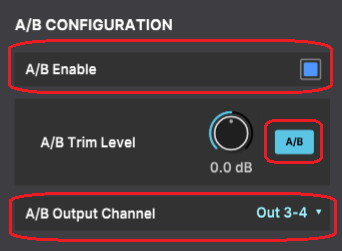
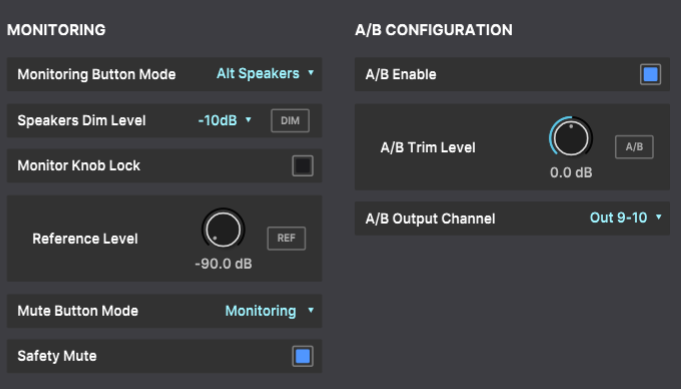
Have you set the Audio Settings accordingly?
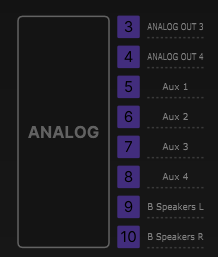
If you have selected Out 3-4 as the B Speakers outputs, there will only be audio on the rear outputs 3&4 when A/B is enabled, and ALT (A/B) speakers is activated.
Personally, I use Out 9-10 as the B Speakers outputs, and I keep outputs 3&4 flexible in case I want to use the front outputs, and the Monitoring button for A/B speaker switching.
In my studio, the only thing that I would want to “interrupt” would be the alternate monitors, hence my desire to run the monitors on 3/4 instead of one of the other outputs. In my setup, all the other outputs have definitely assigned functions that need to be in use at all times.
At any rate, I swapped some things around and found that the rear outputs, for some reason, do not like the cabling used to reach the alternate monitors. The same cables work fine from the front outputs. I’ll have to see about modifying the cables or running new cables tomorrow. The cabling in question is quite difficult to access, and oddly enough, was also working fine with my old interface.
I’m guessing there’s something different about the way Arturia have chosen to balance the outputs that does not like being “Y” cabled down to a three-conductor cable with a left-on tip, right-on-ring, ground-on-sleeve configuration (essentially, running a stereo signal on a single balanced cable). It would not be the first time that Arturia have created some “interesting” balanced outputs.
The rear panel analog outputs are standard balanced TRS mono outputs, not stereo.
The only specificity on the 16Rig is the fact that they are DC-coupled (which allows using them to send CV signals to modular synths).
The Left/Right Y cable that you are describing is used for stereo outputs such as headphones outputs (which is also possible on the front outputs 3 and 4 when set to Alt Phones).
TRS “Y” cables are also sometimes used on systems that have unbalanced send/return on a single jack (like the inserts on the AF Studio), but not on mono outputs.
I’m aware that the rear outputs are mono. I’m not trying to get a stereo signal out of a single rear-panel connector. I’m also aware that the front panel outputs can be configured to be. headphone outputs.
The Y cable you’re thinking of has a Male TRS to two Female TS. The cable that I’m using is the opposite: Two Male TS to a Female TRS. It’s made to do pretty much exactly what I’m doing. It’s been doing the job with my previous interface for the past three years, so I know that the cabling and adapter can do what I need it to do.
I’m not new to the audio world, just new to the 16Rig, something you would have had no way of knowing.
At any rate, I’ll dig in again a bit this morning and see what I learn.
Apparently, my 16Rig does not like something about that particular adapter, but only on rear outputs 3 and 4. It works fine on all other output pairs, including the front outputs. Maybe that’s not odd. What is odd is that another seemingly identical adapter (same manufacturer, same part number, purchased at the same time) works fine on rear outputs 3 and 4.
I’m not sure this is a solution or resolution, exactly, except that everything is now working. Maybe the message here is not all cables and connectors are as equal as they may appear? Or, my 16Rig was simply being confused.
1 Like
_Need help ?
When you can't find the answer online or in the product manual, the Technical Support Team is here!.
_Stay tuned
Follow us for the hottest sounds, fresh content, exclusive offers and Arturia news as it happens.