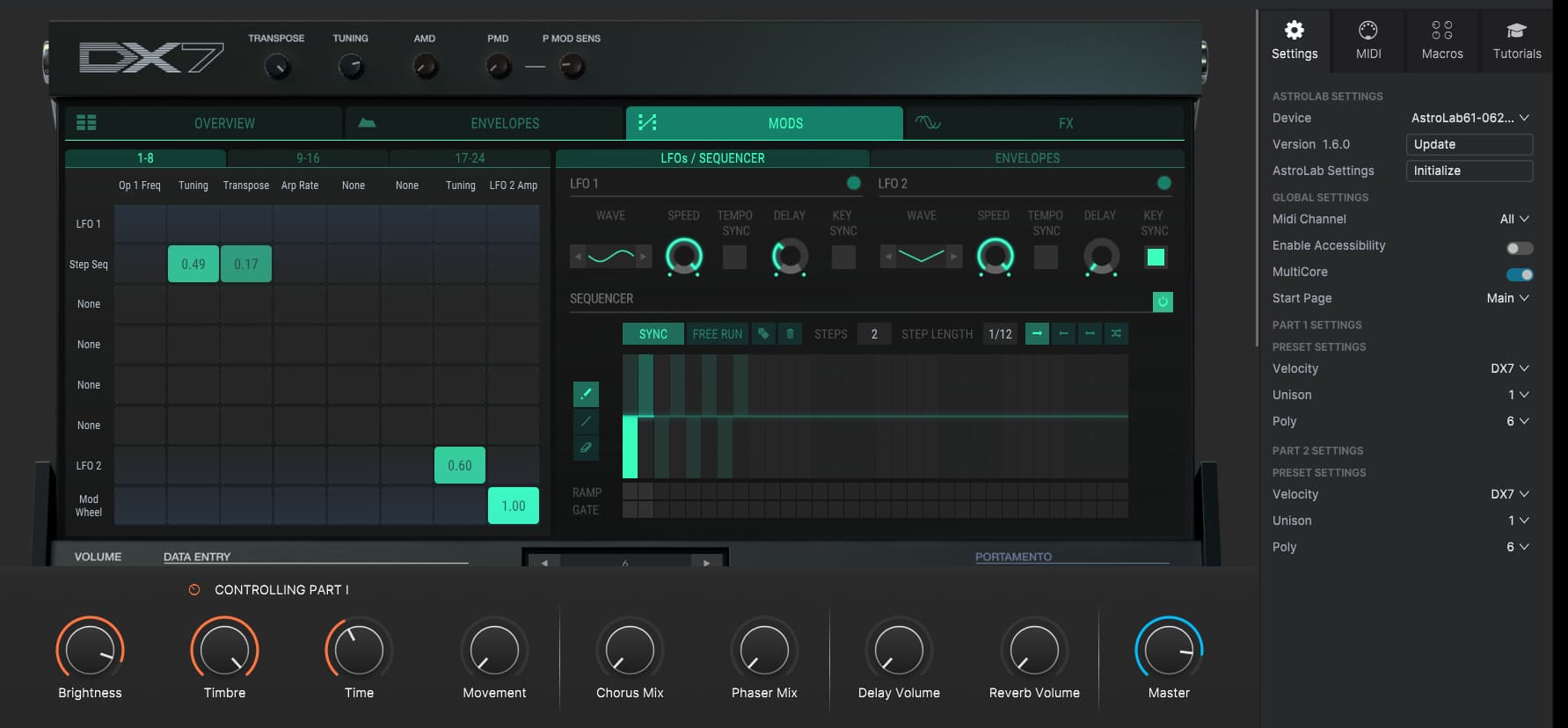
I’m trying to create a preset to use on my Astrolab using DX7 v. The left side is just a sequence of two notes, the right side is the same sound but not in a sequence, so I can play it freely. The problem I’m having is the speed. It’s too fast. And when I adjust the step length down from 1/12 to 1/8, which seems like it should be the right speed, it kind of does this weird stutter. (Not computer stutter, it’s like the sound is programmed that way). Question is, how do I just slightly slow down the sequence of two notes? I’ve got it set up pretty much the way I need it, except that the sequence is moving too fast.
Edit: I’m using Analog Lab to create the preset, but both sides are using the DX7. Also, the speed knobs on LFO1 and LFO2 don’t seem to do anything on this preset.
When you use SYNC settings, then you set note values that follow a set tempo. The change you tell you make give a total different rytmik feeling. If the sound for example use a delay effect, then that might give you what you call stutter. But i can’t tell for sure without knowing/ having the preset.
Tempo as BPM can in Arturias standalone applications be set in the Audio and Midi settings panel in the main menus. This Tempo settings is not saved with the presets.
When the applications are used in a host they sync to the host tempo.
Controllers/ Keyboards can have options to set BPM Tempo for use with sync settings in presets.
If you use Astrolab as it look like, the please consult Astrolabs manual section “3.8.0.1. General” - and perhaps more. I don’t have an Astrolab.
If you don’t use Sync settings for anything in a DX-7 V preset, then you can set the the Sequencer tempo in Hertz. In this case you set a tempo. This setting does not sync to anything else, and it can freely be adjusted.
Please consult the DX-7 V manual section “8.3.7. Step Length” for more info about the Sync/ Unsynced settings.
Which model of AstroLab? (this should probably be a question posted in the AstroLab topic)
On the 61 and 88, instead of sync’ing to the Master Tempo (Internal or External), you can also set and save a specific BPM tempo for each user preset (when Tempo Sync is disabled in the General Settings).
On the 37, not yet… (at this time, only the onboard Arpeggiator can be set to a manual BPM for each preset)
Basically, what I’m trying to make is the bell/music box sound from the Mushroomhead song Solitaire Unraveling. The part at the beginning specifically. I want to make it so that I can hold one of the lower keys and do the low part, that’s just the two alternating notes as a sequence, and play the rest normally on the higher keys.
I would create two sounds. The first with the ARP on. Only one Octave range. Then play the two notes in the sequence. The second with the ARP off.
Then use both in a Multi in Analog Lab.
The ARPEGGIATOR have a SYNC and a RATE parameter. They work like i have described above.
Perhaps use the DX-7 V Factory preset “Celestia”, unless you have a better one.
You can use the Macros and the DATA ENTRY parameters to change the sound easy.
1 Like
_Need help ?
When you can't find the answer online or in the product manual, the Technical Support Team is here!.
_Stay tuned
Follow us for the hottest sounds, fresh content, exclusive offers and Arturia news as it happens.