New guy here. Loving my little Astrolab 37 - she sounds and looks beautiful, is built with care and detail. I do however have a few notes/comments/suggestions for your consideration.
Add MIDI out to Host port. This would be great for syncing an external keyboard controller’s ‘ARP’ or ‘Beat Repeat’ clock to the Astrolabs clock. Also would allow Astrolab to send MIDI notes to devices such as Deluge for recording into (and syncing Deluge’s clock)
Agree with others that Presets (or Songs) should be able to specify their own tempo. Would be great to display tempo on screen too (maybe where CPU % is shown - when not turned ON)
Additionally agree that MIDI Local Off should be implemented and be accessible via a quick key combo (suggest Shift-Select Menu). I am aware of work around using alternative MIDI send channel, but this seems like a bit of a ‘hack’ and can affect the use of the B3 Organ presets.
Please look at method of how Digital-Delay tracks external clock sync and consider adding an integration window to smooth out jitter. As it stands, it appears to be attempting to track external clock too quickly - which leads to warbling. Have tested with MPC, Deluge, Move etc via DIN and USB and all trigger the same behaviour. Note Tape Delay and Analog Delay don’t seem to suffer - but most Presets have Digital Delay set.
Would to be able to configure Split Presets on AL37 hardware like its larger siblings.
I agree with your appreciation of AL37. I’m using it in the country with a Yamaha P145 (88 notes) as controller. There are usb to midi cable. Maybe they’re not efficient.
I also miss the #5 split presets function. The cell app can only change the volumes of respective presets (if I’m not mistaken)
The following mimics it - but may affect the use of some of the Organ Presets. Also, if your connected device has Midi Omni receive on, and you are controlling a device/plugin that is sending back on Channel 2, you may still get a loop.
With these settings, AstroLab will send MIDI data on Channel 1, and it will only receive external MIDI on Channel 2 (Secondary channel)
Factory presets that are set by default to receive on All Channels, therefore they will be played both from the AstroLab’s keyboard (Ch1) and from an external device (on Ch2).
If you want to mimic “Local off”, you also should save your presets Part’s inputs to Ch2, so that they only receive MIDI from the external device, and not from the internal keyboard anymore.
Personally, since the Main MIDI Channel of AstroLab is fixed to Ch1, I do the opposite:
Preset Part Input Channel 1
Secondary Channel 1
Keyboard Ch anything other than 1
Indeed, most B-3V presets are set to receive MIDI on Ch1 for the Upper manual, Ch2 for the Lower manual and Ch3 for the bass pedals.
So far, AstroLab can only receive clock, not send it, even on the 5-pin MIDI Out
Therefore, it would require both new features: MIDI Out via USB Host and MIDI Clock Out.
Actually, they do (if Tempo Sync is disabled in Setttings / General), but unlike the AstroLab61/88, AstroLab37 doesn’t have a dedicated Tempo button.
AstroLab37 can only display/adjust the preset’s tempo when receiving a MIDI CC#110 message (value >64) on Channel 1 (if Secondary Channel is set to 1 or All).
This CC is used for “Tap Tempo” (averaging taps timing after the 3rd tap), but when receiving this CC, AstroLab displays the Tempo screen fo 3 seconds and if you turn the main encoder while Tempo is displayed, you can adjust the Tempo value (Tempo remains displayed until you stop turning the main encoder).
Then, if you save the preset as a User preset, the Tempo will be saved with it.
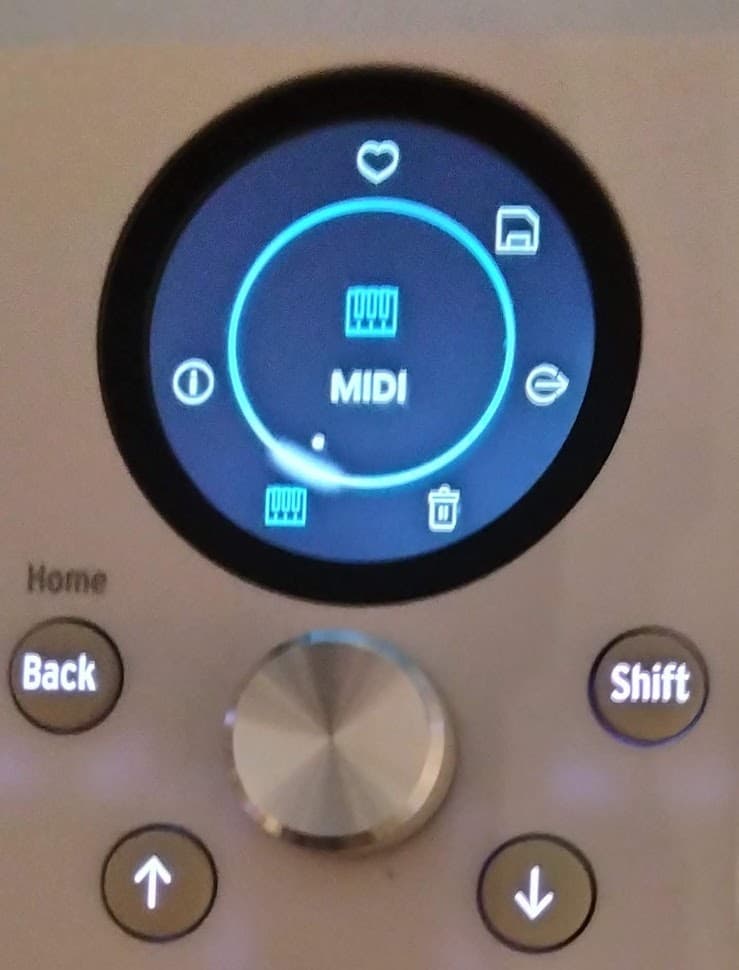
I agree that a direct access to the Preset’s Tempo should be implemented. I suggested adding it to the Preset menu (Like, Save, Add to Playlist, Delete, MIDI, Info), which is accessed via a long-press (or Shift+Click) on the main encoder when the preset intrument’s icon is displayed (main Preset display).
Agreed. As described in my previous post, it is possible to mimic, but a bit convoluted.
While it is not possible to create new Multis on AstroLab37 itself, nor change the patches individually on Part1/Part2, it is already possible to edit the key-ranges (and MIDI Channels and more parameters) of Part1 / Part2 of existing Multis, in the MIDI sub-menu of the Preset menu. So you can change a layered preset into a Split preset and adjust the split point there.
 to be able to configure Split Presets on AL37 hardware like its larger siblings.