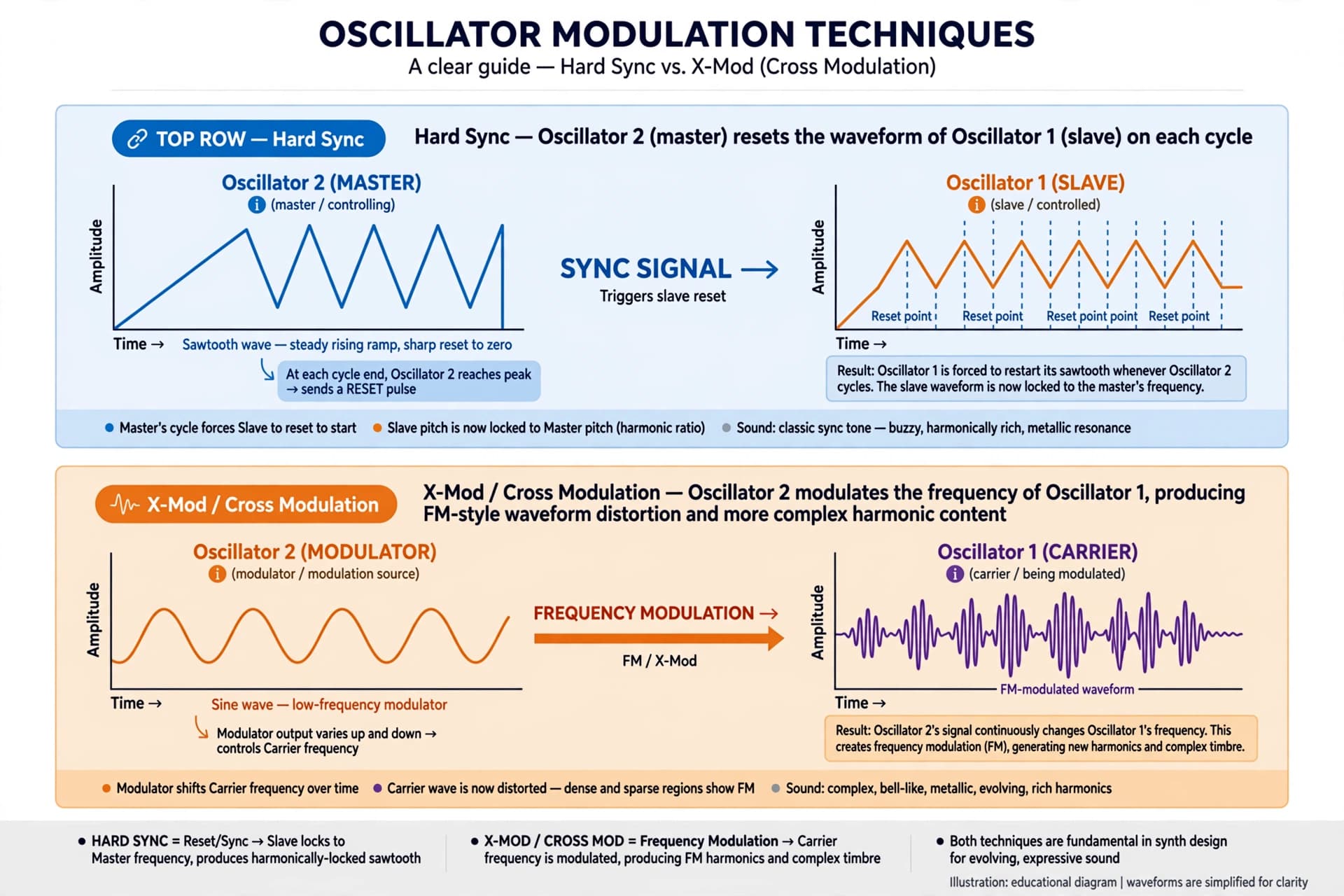
Hello , I don t really understand the difference in the oscillators section between X- Mod and Syn in theory .Someone is able to explain to me ?
Thanks
Hello , I don t really understand the difference in the oscillators section between X- Mod and Syn in theory .Someone is able to explain to me ?
Thanks
Hi @Yves. Welcome back.
X-mod:
OSC 1 is modulated by OSC 2.
Sync:
Depending on the Sync setting in the lower tool bar one OSC is Synced to the other. Meaning One OSC’s cycle is forced to match the other.
Is that what you mean?
yes but I don ’ t really understand the difference between "Synced "( I see what it means , the cycle who restart ) and "modulated " .
Thanks
You are almost there. X-Modulation changes the behavior of the receiving OSC and because the modulation happens at audible frequencies (not like a LFO), this reshapes the waveform rather than just creating a subtle movement.
It works like that i think:
Osc 2 aka the Modulator, acts as the source signal that forces change.
Osc 1 aka the carrier, receives the signal and changes its behavior based on how hard it is pushed by Osc 1.
It’s hard to explain in words. But -
For Sync try this just to get something easy to listen to for the understanding:
When using X-mod OSC 2’s frequency modulate OSC 1’s frequency. The frequencies is not locked. OSC 2 actually change frequency, when you change it. And OSC 1’s frequency is affected by OSC 2’s frequency. That also mean the overall frequency of a played note can be out of tune. This we need to be aware of.
This modulation also change the sound.
The chosen Waveforms have no impact on the effect.
The X-mod can for example provide Ring modulation - Bell like sounds - like the factory preset “Boularde”. But it can also be used to get some chorus like effect in sounds when used more subtle and using both OSC’s.
I can suggest you use a Oscilloscope and a Tuner to get visuals about what happen, when you change the different parameters.
This i how i see it.
I hope this can help you.
If you need even more technically explanations, then i suggest you try to find articles about Sync and X-mod.
Merci à tous , je vais lire et essayer cela des que j aurai un peu de temps .MERCI !!!
I have try and it s Ok … thanks a lot
Follow us for the hottest sounds, fresh content, exclusive offers and Arturia news as it happens.