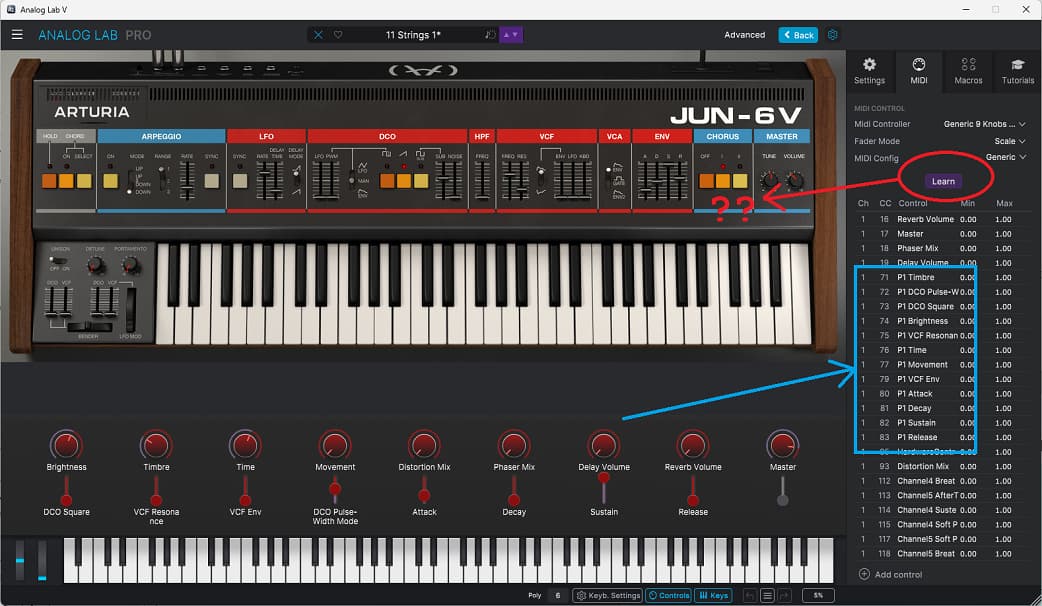
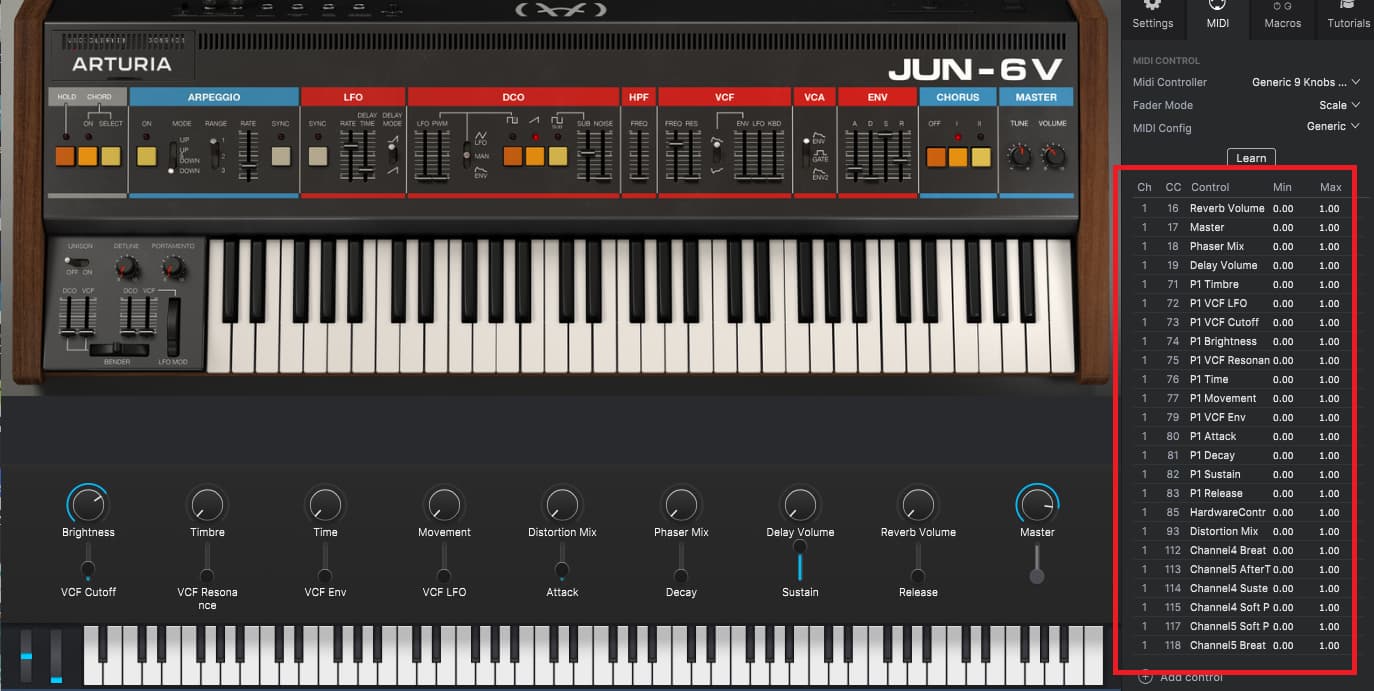
If I select “Generic 9 knobs and 9 faders” as my MIDI controller in Analog Lab I can have that many parameters on screen, like this:
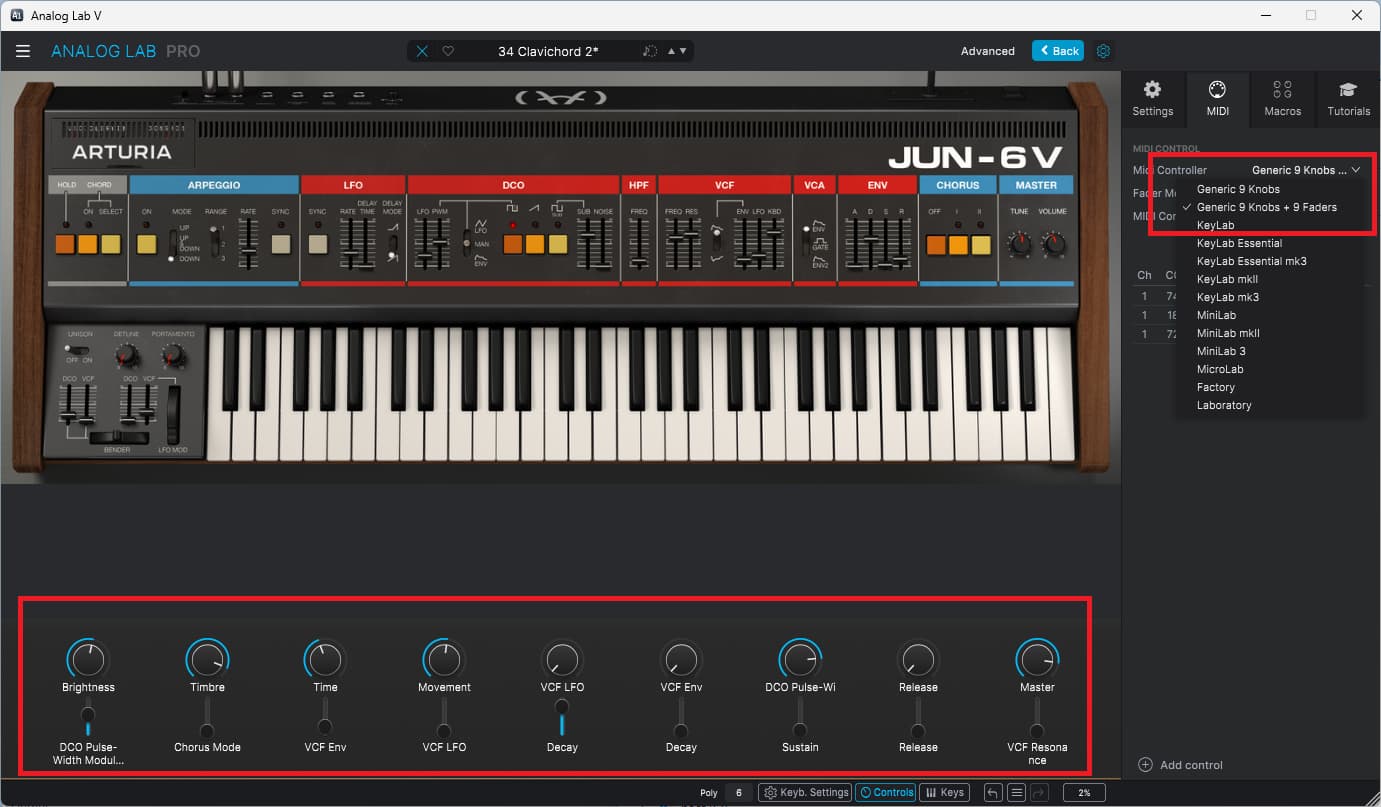
Is there any way to get more controls than that? My MIDI controller has a lot more…
If I select “Generic 9 knobs and 9 faders” as my MIDI controller in Analog Lab I can have that many parameters on screen, like this:
Is there any way to get more controls than that? My MIDI controller has a lot more…
Hi @ftb. Welcome back.
No. 9 Knobs and 9 Faders is maximum layout for Knobs and Faders.
But beside using certain reserved parameters how would you use more controls? As far as i know you can’t use more controls at the same time in Analog Lab. You can in the full individual instruments.
There’s more than 9 faders on that Juno, and a lot of buttons/switches, too.
I’d like to assign them all as MIDI CC for use in my Astrolab 37.
Afaik you can have a setup of 14 parameters to choose from to be controlled by the knobs and faders located on the layout in Analog Lab. That’s it. That’s what i meant with how?.
Some of Analog Labs controls are hardwired beside the 14.
If you wan’t to control more parameters using (more) other midi CC’s than the ones i’ve mentioned, then you also need to own and use the full individual instruments.
Analog Lab have it’s limitations for controls. It’s not an instrument in it self. It uses presets made in other instruments.
When using Analog Lab, then you are controlling Analog Lab, and not the individual instruments directly.
Afaik Astrolab use Analog Lab.
Yeah, I own the full instrument.
There’s a list of MIDI CCs but when I click "learn it doesn’t highlight any controls on the synth for me to pick.
I can assign the on-screen knobs/sliders through a hidden popup menu, I can give them CC numbers.
I can’t find a way to assign CC numbers to any synth parameter that isn’t assigned to one of the nine sliders. All the other CC parameters are generic junk.
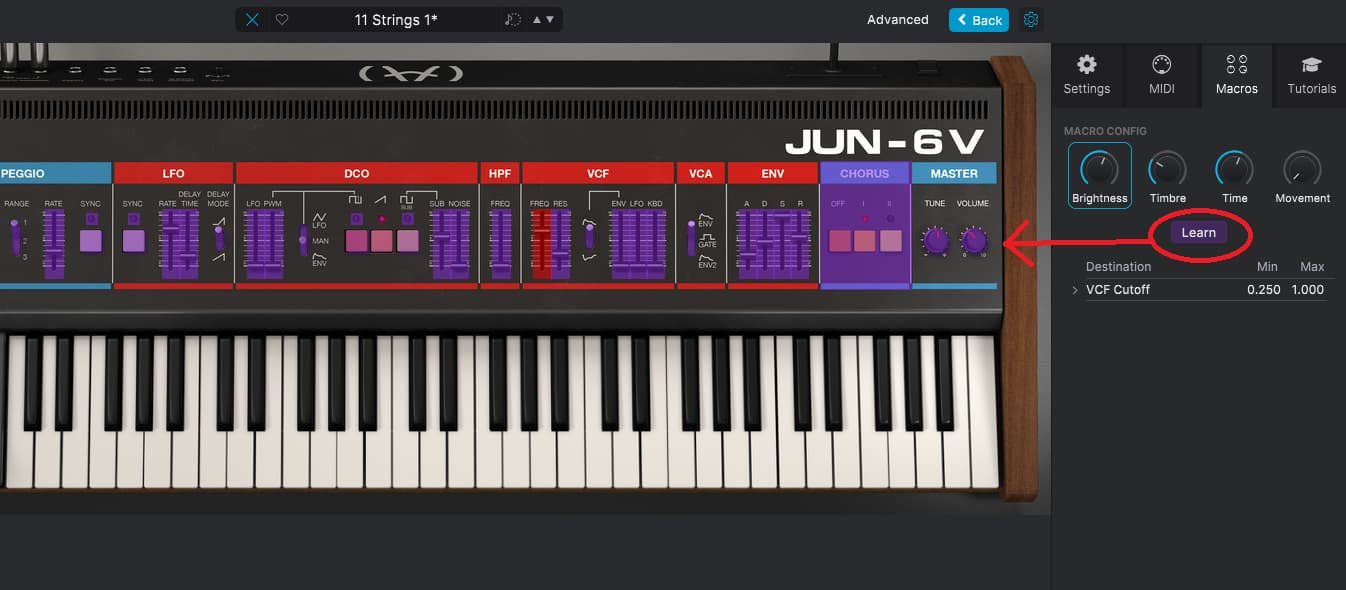
If I go to the “Macros” tab and click “learn” then the sliders on the synth turn purple and I can click one to assign it to that macro knob. Is there a way to do this for MIDI CC controls?
That’s because the midi Config in Analog Lab is for Analog Lab. It’s not for the Individual instrument.
The midi config is to link your hardware to the softwares controls. When in Analog Lab that’s to Analog Labs own controls.
As i said, you need to use the Full instruments by it self and it’s own Midi Config to get more midi CC’s available.
You can try this in Analog Lab:
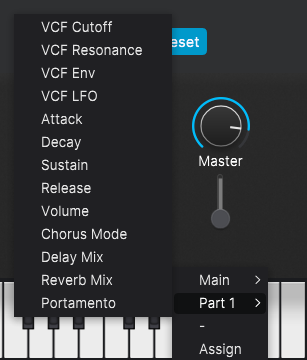
In your image you see a GUI control not assigned to a parameter. The last fader of the 9. Click below the fader where the parameter name should be. Here you can change the parameter to control.
First click Part 1 and select Portamento so a available parameter is selected.
Then click the parameter name again and select ASSIGN. The instrument open. Click an available parameter in the instrument/ Juno.
Save the preset. Save As when Factory preset.
Click the parameter name again and select Part 1. Notice the Portamento parameter is gone and replaced by the parameter you selected.
EDIT: Also notice Analog Labs Midi Config names has changed accordingly. EDIT END
I think we maybe have wires crossed here…
I’m trying to make presets for my Astrolab 37 keyboard that can respond to as many faders as possible on my MIDI controller.
AFAIK: The only way I can do that is through Analog Lab.
I found I can make presets that work in the VSTs but they save in a format for that instrument (eg. Juno saves in .junx format). These files can’t be loaded into Analog lab because that wants .labx format.
I can save presets to preset banks in the VST but the MIDI doesn’t seem to transfer across if I load that preset in Analog Lab.
I can export the MIDI presets in the VST but they’re save in .junmidi format and Analog Lab won’t import them, it wants .labmidi.

I don’t see why this should be so difficult. It’s the same instrument in VST and Analog LAB and every preset in Analog Lab has its own MIDI setup.
Hi @ftb ,
Your topic is about Analog Lab.
I believe i have replied your questions.
Astrolab use Analog Lab. I don’t have Astrolab. I will assume Astrolab use an Astrolab template that match the number of controls Astrolab have available. You can always ask Arturia support through your account. Perhaps someone owning an Astrolab will reply here.
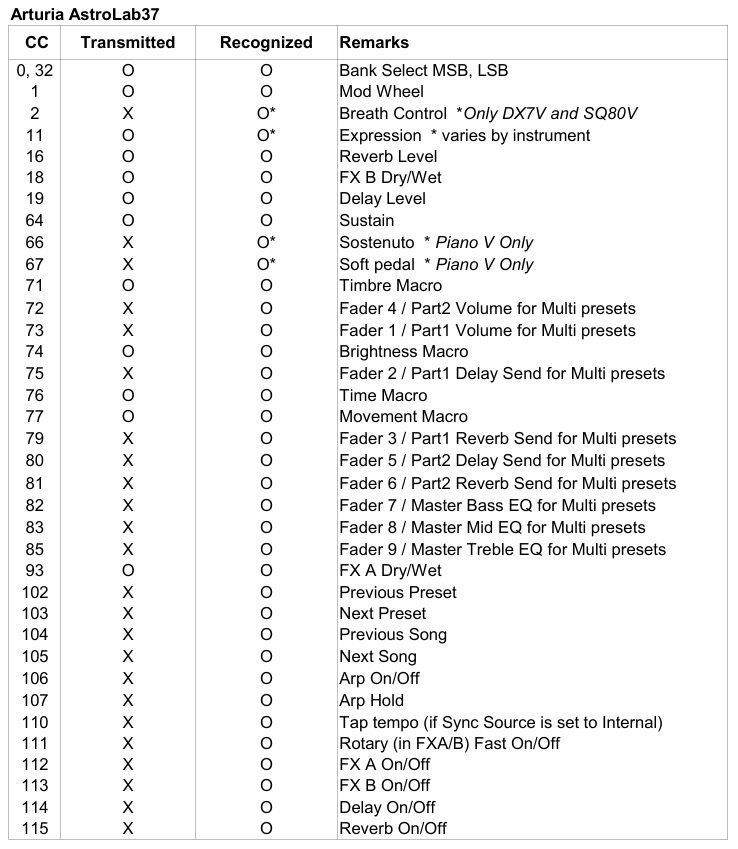
In FAQ you among other informations can find a midi CC implementation Chart for Astrolab:
It’s different on every preset. You can see it by opening the MIDI tab in Analog Lab and switching between piano presets (for example).
Is the Midi CC or the parameter name different? The midi CC should be the same.
Please read this earlier post:
All I know is there’s a whole bunch of MIDI CCs listed on the right.
Half of them seem to have nothing to do with the selected instrument but there’s no way to reassign them to anything useful.
I can only assign destinations and CCs to the row of onscreen knobs/faders, and there’s not many of those.
The VSTs can do it so why not Analog Lab? It makes no sense to me.
At this time, AstroLab has a fixed MIDI CC mapping.
Custom mappings in Analog Lab are not sent to AstroLab.
Not sure if that can change in the future.
Sorry, but it sound like you have’nt read and understood my posts.
Please try to read them again. I will say i have explained.
I have no idea how to explain it better.
I can attach this image showing some of the above on how to change parameters for a GUI control in Analog Lab.
I don’t know about Astrolab. I can’t test.
That’s all i can help with.
I know how to do that.
The problem is there’s not many of them.
So on the Astrolab I can only define the 4 macro knobs and that’s it?
No other MIDI mappings at all, everything else is fixed?
Edit: After playing around some more, that seems to be the case. You can remap the 9 faders to other things butt as soon as you restart or re-sync to the Astrolab they reset to whatever they were.
When you create a dual-instrument patch they all change to controls for mixing the two parts, eg. “P1 Volume”, “P2 volume” so no synth control at all.
I’m sure proper MIDI mappings would sell a lot more Astrolabs (and copies of Analog Lab).
The 9 faders functions are saved on a per preset basis (like the 4 Macros), not global.
If you edit faders assignment for a preset on Analog Lab, you also have to save the edited preset in AstroLab.
Yes, that’s the default faders “master” functions for Multis (as shown in the chart I posted above).
They can be re-assigned to some other parameters in the EDIT PRESET page (FX parameters in particular), but not to specific Part1/Part2 parameters.
On Analog Lab and AstroLab61/88, you can also select Part1 or Part2 instead of the “master” Multi control, so you also have the 9 faders for Part1 parameters and 9 faders for Part2 parameters. The same 9 CCs are always used, but their functions depend on whether Analog Lab / AstroLab61/88 is in Master, Part1 or Part2 control mode.
Unfortunately, this option is not currently available on AstroLab37 (it doesn’t have the dedicated Part1/Part2 buttons that are on AstroLab61/88).
Follow us for the hottest sounds, fresh content, exclusive offers and Arturia news as it happens.