MacOS Tahoe 26.5.1, ASC doesn’t open at all. It just bounces up and down in the dock.
My first post to this forum was due to ASC not working - hence the nickname I use here. Now it’s broke again. I have to force quit it, and it just does not work.
So… if I download the latest version, it works again.
What happened to the update feature that is built in to ASC? This is an extremely frustrating experience.
It’s not hard to do. In my other life I am a UNIX programmer. I have been programming this sort of thing for more than 25 years. I know bad programming when I see it.
Posting an issue here may be picked up by Arturia. If you really want it investigated, I suggest logging a support request with them.
From my experience, running the same OSX as you, I have never had an issue and ASC updates automatically when necessary. So, maybe there is something else at play here.
@Funtmaster is correct, this is really a ‘user led’ forum for swapping ideas, chatting about Arturia synths, and others of course, rather than a technical support forum.
Of course, there are people who may or may not have the answers we’re looking for.
The best course of action for yourself would be to contact Arturia Support directly, who may be able to help you dig deeper.
There are plenty of other threads here about ASC foibles and broken things. I am swapping my experience of ASC here.
For reference, my first experience of ASC was that it would not download the V Collection X instruments. I tried and tried (even though I should not have to). I had to download them one by one. So forgive my complaint if my experience of ASC is not good.
I appreciate that there are other threads here in a similar vein. However, unless there is a general outage or buggy version of ASC, I think each of those threads relate to that persons experience and their setup. So, as the vast majority of people are not posting issues here at this moment, it would still be worth you while to log a support ticket. If there is a bug, I am sure Arturia would like to know about it.
Who knows, one day you might have to change your nickname to ASC_is_working
I previously contacted Arturia support, and followed their instructions to the letter. It was a painful experience. I captured log files, and sent them back. I even gave my guess (based on my programming experience) what was happening. It took up a lot of my time.
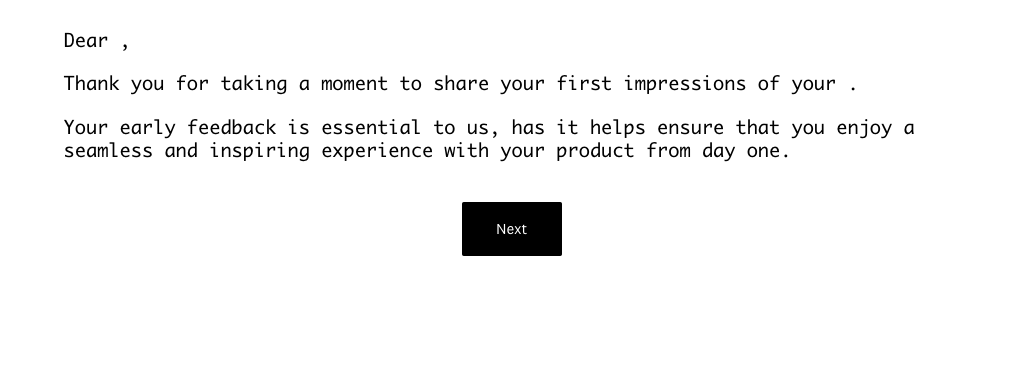
Frankly, I am not much endeared to Arturia support. I bought the Memory Vsynth almost as soon as it came it. It is good. A while later, I received an email asking for my feedback about the instrument. I clicked on the link. The linked page did not contain my name or the name of the instrument. Both were blank. Let me paste it below:
So I decided to contact Arturia to give them some feedback about this. Polite, helpful feedback. I received an auto-reply, and a ticket number. Then nothing.
On Friday, I received another auto-response telling me they have received no news from my side. Were they expecting any information? The auto-reply didn’t ask for any.
So I logged and looked at the ticket. There has been no update at all from Arturia.
I don’t much care for Arturia support. Frankly, it sucks. That’s a pity because the virtual instruments I have (and the little bit of hardware) are fine. I was going to give positive feedback to Arturia about Memory V. Instead, I wasted my time raising a ticket which nobody has looked at.
So I won’t we wasting even more of my time raising support requests about ASC with Arturia. Instead I will vent my spleen here.
Sorry to hear about your negative experience. I can understand that would be frustrating and not the quality you’d expect. I’m going to share this feedback directly with the team involved to ensure this doesn’t happen again.
If you’re still having issues getting your ASC running, please don’t hesitate to reach out to our support team. They will do their very best to help.
Runs fine here on my M1 Max MacBook Pro, MacOS 26.5.1. In fact, the only time I’ve ever had a problem with ASC, on either MacOS or Windows, is during periods of heavy server load or when my ISP is having a bad day.
Given my propensity for f-ing software up and figuring out how out un-f-it (I actually spent 20+ years getting paid for it), I’d politely say that if it works for me, the problem is likely somewhere buried in your system – something wanked a permission, or there’s some other conflict with another piece of software, or maybe Apple did something in the OS that affects specific configuration combinations.
When something as simple as (what is in effect) a combined licensing and download manager does not work, it is fair to say the programming is bad. Problems like this should not occur. I went through numerous attempts with support in November 2024 to solve the problem.
I will give you a clue here so you will see why I am justified in my frustration, a sample from an old debug log file. Just three lines is enough to show bad programming:
| 33747 | T3394974 | download | notice | Download complete (“/tmp/Arturia/Synthi_V__1_9_2_5305__vst3.pkg”) 2192 ms
| 33747 | T3394974 | download | error | The size of /tmp/Arturia/Synthi_V__1_9_2_5305__vst3.pkg is 16842219 while 22286118 is expected
| 33747 | T3394974 | download | notice | Download failed, remove file “/tmp/Arturia/Synthi_V__1_9_2_5305__vst3.pkg”
Comments: Line 1, download complete. Line 2, it is obviously not complete. Line 3, Download failed.
Can you give me a reason, other than bad programming, why an application should report download complete, but then in the next line show it is obviously not complete?
As mentioned, this sort of requirement of reliably downloading files is something that was solved a very long time ago. It is not a problem with my system - I could download them directly using a browser, which was no fun for about 40 instruments in V Collection. It was a problem solely with ASC. I know bad programming when I see it.
I don’t know about DSP programming. But downloads, yes I could teach a thing or two.
In my second post in this thread, I reported that downloading the latest version fixed the problem. But I still have no idea what happened to the builtin update feature. Presumably it couldn’t download it.
_Need help ?
When you can't find the answer online or in the product manual, the Technical Support Team is here!.
_Stay tuned
Follow us for the hottest sounds, fresh content, exclusive offers and Arturia news as it happens.