Is there a way to set bpm for a preset? Or a Song? I only see where I can set the overall BPM for the entire keyboard in SETTINGS. But each song has a different tempo.
There’s a preset called “Pulse of Optimism”. It uses Piano & Jun-6. The Juno is pulsing with a rhythm. I’d like to change that pulse to 68bpm, 16th notes. Suggestions? I own V Collection 11. So all is editable. Also trying to start the pulse on key trigger. Instead of free running.
Hi @EnjoyRC ,
The TIME macro control the Juno’s Pulse rate. It’s the LFO2 Rate. The rate is synced to tempo. The TIME macro can set it to 1/8, 1/12 and 1/16 notes of any set tempo.
You can’t set a specific preset to a specific BPM. Rates can be set to Hertz though, when creating a preset, and some are so.
(EDIT: It’s possible Arturia are looking into a future BPM pr song feature, but i can’t tell. EDIT END)
I don’t have a Astrolab. But it look like Astrolab can use a internal clock.
Have a look in the manaul section 3.8. The Settings page - 3.8.0.1. General. The Tempo Sync Source can be set to Internal. Then the Synced presets should sync to that tempo setting.
The Juno LFO2 Retrig is set to OFF in that preset.
If you own full individual instruments, then you can do deep editing including for rate and retrig settings.
I can’t tell if Astrolab have other options. Perhaps an Astrolab user know.
I hope this helps.
1 Like
Currently, the Internal Tempo is Global, for any sync’ed parameter (f.i. sync’ed Delay time, sync’ed LFO rate, sync’ed Arpeggiator, …).
For unsync’ed parameters, the preset’s time/rate/BPM value is set in the instrument.
You can open that preset in Analog Lab, and then open the Jun-6V.
You’ll see that the “pulse” is controlled by LFO2 in the Advanced tab, and it is Sync’ed with the rate set to 1/8 (of the Global tempo).
To specify a custom rate, disable the LFO2 Sync and set the rate in Hz accordingly.
For 68 BPM, it would be 1.13Hz, or 2.27Hz or 4.53Hz depending on the time division.
Here’s a good online BPM/Hz calculator:
Change LFO2 Retrig from OFF to Mono.
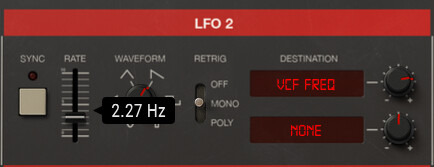
Then Save the edited preset and send it to AstroLab.
Note that the AstroLab’s ARP rate for its own Arpeggiator can be sync’ed to the Global Tempo, or set to a specific BPM which is saved on a per preset basis.
2 Likes
Thank you so much for the THOROUGH details. A bell went off in my head while reading your guide.
Now I know that some parameters don’t immediately send to the AstroLab when edited in AnalogLab. So I was tweaking settings and not hearing any changes. So I thought the LFO2 wasn’t the LFO creating the pulses.
I have to send the patch to the AstroLab. Or monitor AnalogLab itself while tweaking.
Thank you so much!!
1 Like