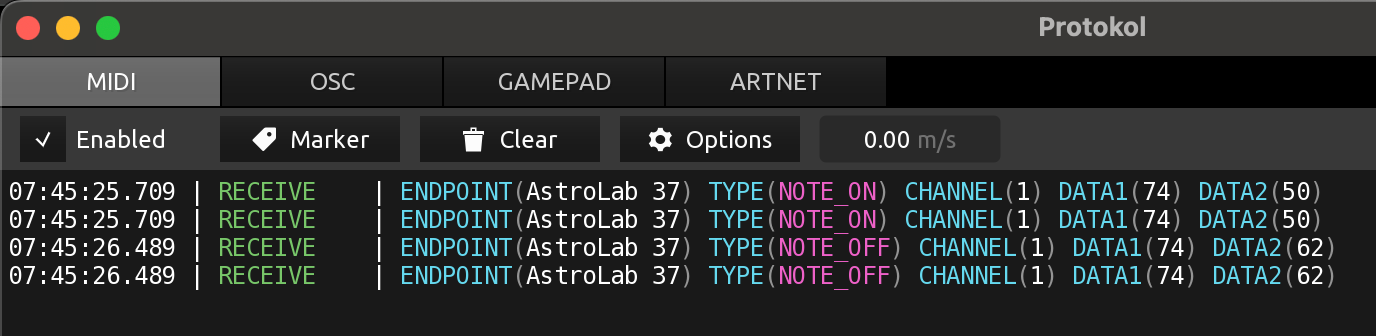
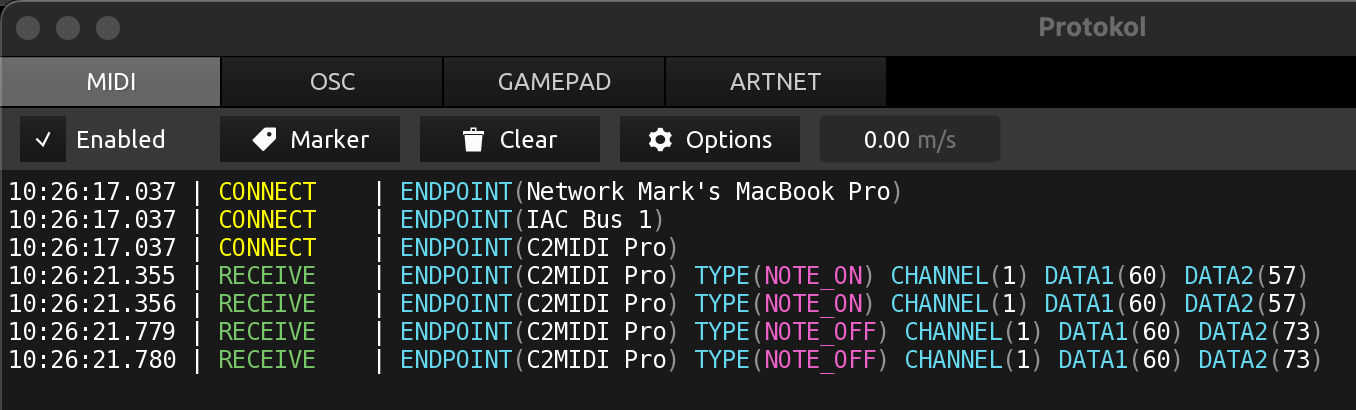
Each note sends 2 messages. No loops. No other software loaded. Only 1 AL37 and Protokol loaded. I use Protokol all the time to troubleshoot MIDI communications. This is the first time I’ve seen this.
Sat here scratching my head too, loop was the first thing in my mind, but you’ve already discounted that.
Can you describe your setup in detail?
The only two things i can think of that might do that would be a loop somewhere, if you’re using a DAW based setup, or it’s something component based.
I take it you’ve also tried a different midi controller with different results?
Nothing special loaded at this time. Only software loaded is Protokol. Simple USB-C connection from AL37 to MacBook Pro USB-C port. No BOME loaded, or any other MIDI utilities. Just now, I tried My Arturia MiniLab 3, it sends single messages.
It’s fortunate if it does’nt affect anything.
Do it send on 2 ports or something like that? Just a thought.
I can suggest you contact Arturia support through your account. I assume they would know if this is normal or not, and if it should have an impact on anything.
Yep, this is where my thoughts were headed too, this is a reasonably common issue in Cubase when setting up midi ports initially.
Any chance of some screenshots showing your routing settings?
Definitely worth giving Arturia support a shout too, if it IS a hardware issue then they will certainly want to know about it.
Thanks @matjones, I created a support ticket.
Another thing that adds to the head scratching… Notes are doubled. No CC messages are doubled. That eliminates any system loop theories.
Yeah, it’s a weird one for sure @EnjoyRC
That’s why i asked if a DAW was involved initially, as it sounded like you might have inadvertently set up a loop. The fact it’s only double triggering notes and not CC data would add to that thought too, as it sounds like a filter had been set up as well. It’s clearly NOT the case here, though.
This can happen when the current preset is a Layered Multi preset (Part1 & Part2 on the same or overlapping key-ranges).
It shouldn’t happen with Single presets, nor with Split Multi presets (no overlap).
The “MIDI Out Filter” (in the Settings / MIDI In/Out menu) is set to either Auto or “All Notes”.
It shouldn’t happen if it is set to “Keyboard only”, even with an active Layered Multi preset.
Some explanations:
When MIDI Out Filter is set to “All Notes” (or “Auto” without being linked to Analog Lab. When AstroLab and Analog Lab are Linked, the “Auto” MIDI Out Filter switches to Keyboard Only mode), played notes, arpeggiated notes, chords, and
scale quantized notes (processed MIDI) are transmitted on the MIDI Out channel of each Part.
When MIDI Out Filter is set to “Keyboard only” (or “Auto” when linked to Analog Lab), only the notes played on the AstroLab keyboard are transmitted via MIDI Out on the Keyboard Channel, regardless of the Parts settings and of the Arp, Chord/Scale status.
The MIDI Out Filter only affects Notes, not CCs.
CCs (Modwheel, Sustain, Expression, Macro/FX knobs …), PitchBend and Aftertouch messages are always sent on the Keyboard Channel.
Thanx @Sean_W, That was it. Multi-layered patches send 2 MIDI Note On messages. Some even send note messages an octave apart because one layer is transposed.
1 Like
_Need help ?
When you can't find the answer online or in the product manual, the Technical Support Team is here!.
_Stay tuned
Follow us for the hottest sounds, fresh content, exclusive offers and Arturia news as it happens.