Haha no worries. I will just not spare time to support crippled bank formats. If you want you can load those into the Aura Editor, export them again and then try to load them into the converter. I also don’t know how these strange formats came into the files. But trust me these contents are not proper (when you load the wc_olo_garb_jp8000_20090929_all.syx into the Aura Editor you only get a bunch of crippled WC patches which all look the same also).
To be on the 100% side I will load these files into Sysex Librarian and will send them to the JP8080 Hardware. If that work I will read them back out which would fix the weird Byteorder. But I doubt that these will even get transferred.
All converted Patchbank folders now can just be copy pasted into the Arturia JUP-8000V User Presets Folder.
Therefore importing each single .jp8x file through the GUI is not required anymore.
Chorus, Flanger, Phaser and Delay Dry/Wet knobs are now also velocity sensitive.
Converter GUI has been updated (Fixed Size + “Detecting Bank…” - Status on Mac)
Here is a small collection I am working on in Analog Labs. I have been creating multis and just having fun. It is interesting that these ‘original’ patches show off just how much of a pad monster the JP8000 was. I have come across some rather interesting patches that made me think “How did they do that?”. So, for me, this is a very worthwhile evercise.
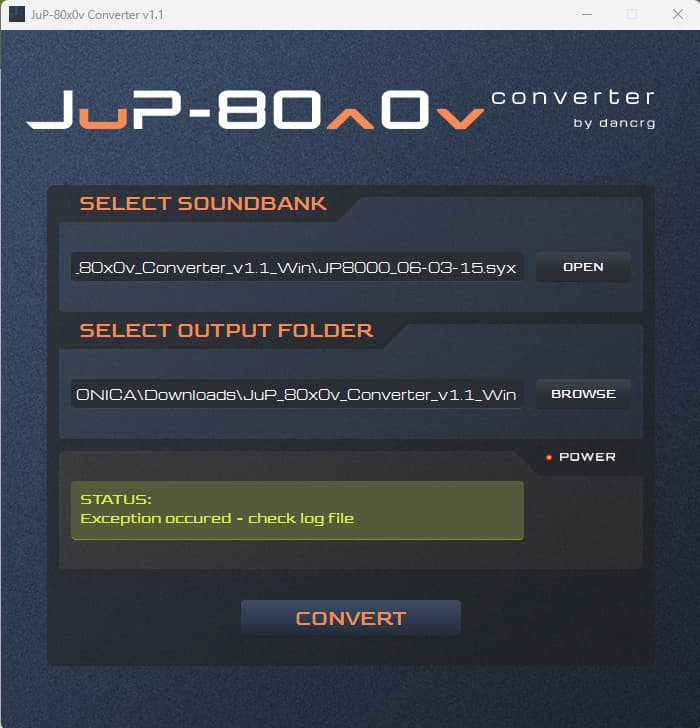
@DanCrg Hi Dan, I am trying to use your converter but I am getting the Exception occurred error. It is from a Syx file I created from my JP8000 in 2015. As I still have my JP8000, I could do the backup again if you think that is the problem. Here’s the text from the log file. I hope you can help, thanks.
Input ( JP-8000 Performancebank ): C:\Users\martin.SYONICA\Downloads\JuP_80x0v_Converter_v1.1_Win\JP8000_06-03-15.syx
Output ( Arturia JUP-8000V Soundbank ): C:\Users\martin.SYONICA\Downloads\JuP_80x0v_Converter_v1.1_Win\JP8000_06-03-15
Traceback (most recent call last):
File “JuP_80x0v_Converter.py”, line 2931, in convert
File “JuP_80x0v_Converter.py”, line 1211, in convert_JP8000_PerformanceBank
File “JP8X_PATCH.py”, line 10, in SET_PERF_PATCH_DATA
File “JP8X_FUNCTIONS.py”, line 2435, in SET_ARP_SWITCH
UnboundLocalError: cannot access local variable ‘jp8x_value’ where it is not associated with a value
Hi Syonix, the .syx file which you have shared has the size of 108kb and contains a mixture of single patches and performances. The converter just supports the exported Patchbank A, Patchbank B (both 16kb), Patchbank A+B (32kb) or Performancebank (37kb) as Syx. If you export your patches in a proper way they should work fine with the converter.
Thank you for the convertor. I had much fun wading thru hundreds of converted patches. As a sound designer, it was invaluable and there were many surprises that helped me hone my own patches further.
Hi there,
First of all, thanks a lot for putting this converter together
I do have a question though : when I convert a .mid for the old JP-8080, it converts the patches separately, but is there a way it can convert it to .jp8x format?