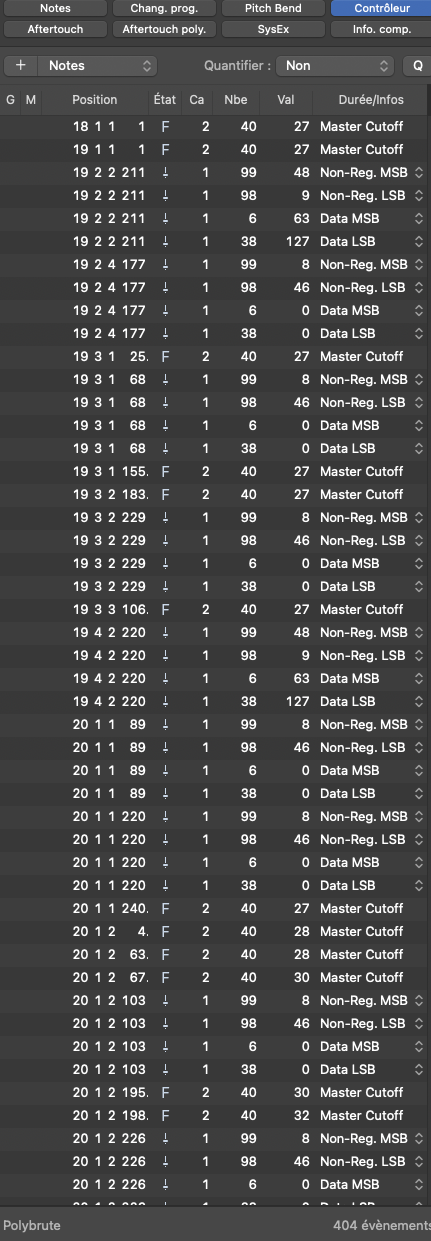
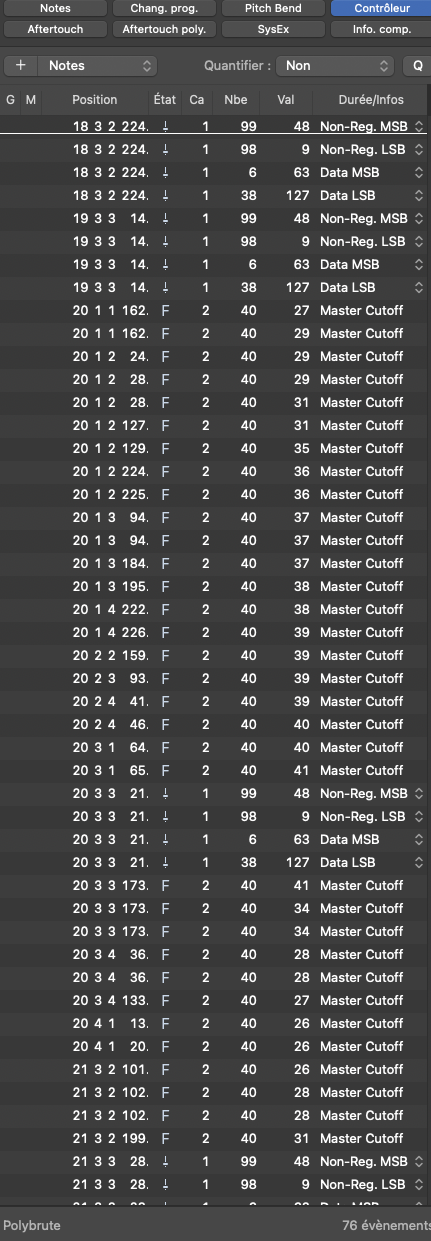
You need to disable each instance of PolyBrute Connect and then the PolyBrute will respond to MIDI CCs like any other synth.
Take a look here… Position #5
You need to disable each instance of PolyBrute Connect and then the PolyBrute will respond to MIDI CCs like any other synth.
Take a look here… Position #5
Unfortunately, this doesn’t actually work for me. Whether Polybrute Connect is enabled or not, played through or not, or even not loaded at all anywhere, the Polybrute does not respond to the CCs for the recorded ribbon or morphee output. It is easy enough to record them (as many people have noted), but I’ve found no combination where it will respond to those CCs. Note that it does respond to other CCs (like manually twiddling the master cutoff knob), just not the ribbon or morphee control.
Hi @Larsaf , sadly, my experience is similar to @JovianPath. Disconnecting Polybrute Connect does help a little, in that it allows the correct playback of more “generic” midi data, such as pitchbend and aftertouch. However, it doesn’t allow the DAW (Logic, in my case) to actually record and playback many of Polybrute’s key expression interfaces - ribbon, Morphee, or most of the synth’s knobs and sliders.
Just to check - has everyone who is experiencing this problem reported the issue to Arturia? For a synth that sells itself on its expression options, it’s somewhat jaw-dropping that this data appears to not be MIDI recordable for most (or all?) users.
Hi @Vischebaste,
you are right… there is an issue.
I’m a Cubase 14 user and I did some testing today. Cubase records ALL MIDI CCs including Ribbon, Morphee, Expression Ctrl 1 & 2 (Foot) and Master Cutoff. But when playing back my Polybrute 12 does NOT react to Ribbon and Morphee. All other (incl. Master Cutoff) seem to work fine.
Arturia has to take a look at this issue.
Hi all,
I’ve been discussing this issue with Andrés from tech support, who has been very responsive and helpful. However, the bad news is that the inability to send ribbon and Morphee data back to the Polybrute hardware is intended behaviour, rather than a bug.
According to Andrés (who has given me permission to quote this):
“At this time, there are no plans to make the Ribbon or Morphée respond to incoming MIDI CCs, and this is the intended behavior. That said, we’ve seen similar feedback from other users, and I’ve shared your comments with the team for consideration in future updates.”
For anyone that would like to see this implemented, i’d recommend raising this individually with Arturia, so that (hopefully) they will get the sense that this feature is desired.
What motivates such a behaviour? I really don’t understand. One should at least be able to choose that behaviour in the settings
Yeah… Saying it is intended behavior with no reason why, is very puzzling. Is it a technical issue? Is it because you are supposed to record and playback performances some other way? It clearly is at least optionally desirable behavior… For now my workaround is to modify patches to route other things it will respond to (like the mod wheel) via the mod matrix, and remap the CCs in my DAW, but that’s a poor substitute.
Ok… So this prompted me to try harder. This is convoluted and pretty Reaper specific (my DAW), but there may be equivalent solutions in other DAWs, as long as you can map MIDI from a track to drive a plugin parameter…
So, here is the process that works for me… One time setup (Reaper specific):
Recording and playback dance:
Hi there,
I’m a new and very happy owner of the wonderfull Polybrute 12.
Untill I tried to record midi notes and CC under Logic, that makes me totally confused… I tried different configs, but the only way I actually found to record and playback my buttons, faders movement and expressivity controls is by recording audio only. I tried with midi only, external device, midi 1.0 or midi 2.0, it’s a mess : some controls are recorded by midi, some via automation, I’m totally lost here. Is there any tutorial that explains the way to go ? Or are we all waiting for explainations and firmware impovment from Arturia ?
Best,
Zika
I’m making some tests with the Polybrute Connect plugin int Logic.
Hey @zikayan, welcome to the hugely disappointing world of Polybrute 12 midi playback 
As I mentioned in an earlier post, the Polybrute’s inability to playback some of the expression data that it sends is a “feature”, not a bug, amazingly.
I have the same data dump into Logic when recording the Polybrute controller data too, you are not alone.
Honestly, the jankiness of the whole MIDI connection setup from Polybrute to DAW means that the synth is sitting there, pretty much gathering dust. I will probably sell it, unless an update arrives to make the whole process easier, more intuitive and more comprehensive.
Hi Vishebaste, thanks !
I just read your posts.
I don’t understand at all the Andrés quote : the ribbon and morphée are controllers, why should they respond to anything ? We are talking about the ability to replay some parameter changes, not to take control of controllers, which would make no sense if I’m not mistaken ?
Vishebaste, did you try to record some parameters change via the Connect plugin panel ? it works fine here. It kills the fun, but it works. So why the hell doesn’t it work when using the hardware panel ? Arturia, please, tell us this will be resolved, I love your synth, I don’t want to send it back ! 
Hi again. I just have a complete check list from André to setup both Logic and Polybrute, and… it seems it works perfectly well ! The Polybrute will remains here for sure  .
.
It’s getting late here, and I will continue testing tomorrow, but I feel very relived, and will publish here his “how to do” list.
Hi @zikayan,
If you’ve found a way to play back the ribbon and Morphee data that you’ve recorded, I’d be very interested! (and pleasantly surprised, as Andrés said that this wasn’t possible!)
I didn’t, Andrès did ! Just created a new topic with the settings that works here (except for very quick movements on the Morphée).
Just to update and (for me, at least) finish off the thread that I started - I did my best to get the Polybrute to play nicely with Logic Pro and have finally given up, defeated and demoralised.
Although it may technically be possible to record and playback all expression data from Polybrute to Logic and back again, there are just way too many hoops to jump through to achieve it. Additionally, Logic records a load of MIDI data specific to the Polybrute, with (as far as i can see) no easy way to disable some of this being sent. I’ve had issues with laggy note responses, etc when using the Polybrute as a controller keyboard.
On the whole, trying to get all of this stuff working was running counter to the immediacy that the Polybrute’s expression functionality should have encouraged and, as a result, i was hardly using it. So reluctantly, I’m selling it. I really hope that Arturia update the software and/or firmware to transform this into the amazing, user friendly experience that all of the above could have been, but it’s too frustrating waiting around for it to happen.
Good luck to all of you!
Sorry to hear that. I did finally get it working in Bitwig. I still don’t think it works in Ableton Live, though. I was also about set to sell my Polybrute, and thought after I switched to Bitwig that I’d give it one last try. It doesn’t work exactly the way I’d like (I have to use the Polybrute Connect plugin), but it works. And I’ll take that.
Cheers, and good luck!
hi, new owner here and in the setup process. would you kindly tell me. where is your Andrès topic placed ?
Follow us for the hottest sounds, fresh content, exclusive offers and Arturia news as it happens.